MCP Toolbox for Databases tool for ADK
MCP Toolbox for Databases is an open source MCP server for databases. It was designed with enterprise-grade and production-quality in mind. It enables you to develop tools easier, faster, and more securely by handling the complexities such as connection pooling, authentication, and more.
Google’s Agent Development Kit (ADK) has built in support for MCP Toolbox. For more information on getting started or configuring MCP Toolbox, see the documentation.
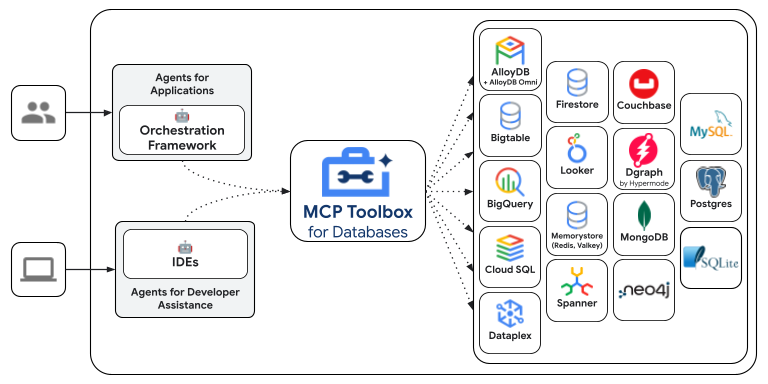
Supported Data Sources
MCP Toolbox provides out-of-the-box toolsets for the following databases and data platforms:
Google Cloud
- BigQuery (including tools for SQL execution, schema discovery, and AI-powered time series forecasting)
- AlloyDB (PostgreSQL-compatible, with tools for both standard queries and natural language queries)
- AlloyDB Admin
- Spanner (supporting both GoogleSQL and PostgreSQL dialects)
- Cloud SQL (with dedicated support for Cloud SQL for PostgreSQL, Cloud SQL for MySQL, and Cloud SQL for SQL Server)
- Cloud SQL Admin
- Firestore
- Bigtable
- Dataplex (for data discovery and metadata search)
- Cloud Monitoring
Relational & SQL Databases
- PostgreSQL (generic)
- MySQL (generic)
- Microsoft SQL Server (generic)
- ClickHouse
- TiDB
- OceanBase
- Firebird
- SQLite
- YugabyteDB
NoSQL & Key-Value Stores
Graph Databases
Data Platforms & Federation
- Looker (for running Looks, queries, and building dashboards via the Looker API)
- Trino (for running federated queries across multiple sources)
Other
Configure and deploy
MCP Toolbox is an open source server that you deploy and manage yourself. For more instructions on deploying and configuring, see the official Toolbox documentation:
Install Client SDK for ADK
ADK relies on the toolbox-adk python package to use MCP Toolbox. Install the
package before getting started:
Loading MCP Toolbox Tools
Once your MCP Toolbox server is configured, up and running, you can load tools from your server using ADK:
from google.adk import Agent
from google.adk.tools.toolbox_toolset import ToolboxToolset

toolset = ToolboxToolset(
    server_url="http://127.0.0.1:5000"
)

root_agent = Agent(
    ...,
    tools=[toolset] # Provide the toolset to the Agent
)
Authentication
The ToolboxToolset supports various authentication strategies including Workload Identity (ADC), User Identity (OAuth2), and API Keys. For full documentation, see the MCP Toolbox ADK Authentication Guide.
Example: Workload Identity (ADC)
Recommended for Cloud Run, GKE, or local development with gcloud auth login.
from google.adk.tools.toolbox_toolset import ToolboxToolset
from toolbox_adk import CredentialStrategy

# target_audience: The URL of your MCP Toolbox server
creds = CredentialStrategy.workload_identity(target_audience="<TOOLBOX_URL>")

toolset = ToolboxToolset(
    server_url="<TOOLBOX_URL>",
    credentials=creds
)
Advanced Configuration
You can configure parameter binding and additional headers. See the MCP Toolbox ADK documentation for details. For example, you can bind values to tool parameters.
Note
These values are hidden from the model.
ADK relies on the @toolbox-sdk/adk TS package to use MCP Toolbox. Install the
package before getting started:
Loading MCP Toolbox Tools
Once your MCP Toolbox server is configured and up and running, you can load tools from your server using ADK:
import {InMemoryRunner, LlmAgent} from '@google/adk';
import {Content} from '@google/genai';
import {ToolboxClient} from '@toolbox-sdk/adk'

const toolboxClient = new ToolboxClient("http://127.0.0.1:5000");
const loadedTools = await toolboxClient.loadToolset();

export const rootAgent = new LlmAgent({
  name: 'weather_time_agent',
  model: 'gemini-2.5-flash',
  description:
    'Agent to answer questions about the time and weather in a city.',
  instruction:
    'You are a helpful agent who can answer user questions about the time and weather in a city.',
  tools: loadedTools,
});

async function main() {
  const userId = 'test_user';
  const appName = rootAgent.name;
  const runner = new InMemoryRunner({agent: rootAgent, appName});
  const session = await runner.sessionService.createSession({
    appName,
    userId,
  });

  const prompt = 'What is the weather in New York? And the time?';
  const content: Content = {
    role: 'user',
    parts: [{text: prompt}],
  };
  console.log(content);
  for await (const e of runner.runAsync({
    userId,
    sessionId: session.id,
    newMessage: content,
  })) {
    if (e.content?.parts?.[0]?.text) {
      console.log(`${e.author}: ${JSON.stringify(e.content, null, 2)}`);
    }
  }
}

main().catch(console.error);
ADK relies on the mcp-toolbox-sdk-go go module to use MCP Toolbox. Install the
module before getting started:
Loading MCP Toolbox Tools
Once your MCP Toolbox server is configured and up and running, you can load tools from your server using ADK:
package main

import (
    "context"
    "fmt"

    "github.com/googleapis/mcp-toolbox-sdk-go/tbadk"
    "google.golang.org/adk/agent/llmagent"
)

func main() {

  toolboxClient, err := tbadk.NewToolboxClient("https://127.0.0.1:5000")
    if err != nil {
        log.Fatalf("Failed to create MCP Toolbox client: %v", err)
    }

  // Load a specific set of tools
  toolboxtools, err := toolboxClient.LoadToolset("my-toolset-name", ctx)
  if err != nil {
    return fmt.Sprintln("Could not load MCP Toolbox Toolset", err)
  }

  toolsList := make([]tool.Tool, len(toolboxtools))
    for i := range toolboxtools {
      toolsList[i] = &toolboxtools[i]
    }

  llmagent, err := llmagent.New(llmagent.Config{
    ...,
    Tools:       toolsList,
  })

  // Load a single tool
  tool, err := client.LoadTool("my-tool-name", ctx)
  if err != nil {
    return fmt.Sprintln("Could not load MCP Toolbox Tool", err)
  }

  llmagent, err := llmagent.New(llmagent.Config{
    ...,
    Tools:       []tool.Tool{&toolboxtool},
  })
}
Advanced MCP Toolbox Features
MCP Toolbox has a variety of features to make developing Gen AI tools for databases. For more information, read more about the following features:
- Authenticated Parameters: bind tool inputs to values from OIDC tokens automatically, making it easy to run sensitive queries without potentially leaking data
- Authorized Invocations: restrict access to use a tool based on the users Auth token
- OpenTelemetry: get metrics and tracing from Toolbox with OpenTelemetry