Build graph routes for agent workflows
Graph-based workflows in ADK define agent logic as a graph of execution nodes and edges, allowing you to build more reliable processes that combine artificial intelligence (AI) reasoning and code logic. These workflows allow you to create logical routes of execution nodes that can encapsulate code functions, AI-powered agents, Tools, and human input. By explicitly mapping out routing logic, this approach allows you to define a specific, step-wise process workflow in code, providing improved precision and reliability over purely prompt-based agents.
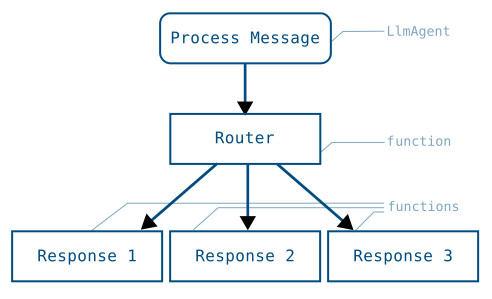
root_agent = Workflow(
  name="routing_workflow",
  edges=[
    ("START", process_message, router),
    (router,
      {
        "output-1": response_1,
        "output-2": response_2,
        "output-3": response_3,
      },
    ),
  ],
)
Figure 1. Visualization of a task graph and the Workflow code to implement it.
The advantage of using a graph-based agent workflow is the significant increase in control, predictability, and reliability over prompt-based agents. By defining the overall process workflow in code, you gain more control over how tasks are routed and executed. This structured node definition improves the predictability of agents and enhances reliability for complex tasks that require defined steps and process management.
Alpha Release
ADK 2.0 is an Alpha release and may cause breaking changes when used with prior versions of ADK. Do not use ADK 2.0 if you require backwards compatibility, such as in production environments. We encourage you to test this release and we welcome your feedback!
Get started with graph-based workflows in ADK by checking out Graph-based agent workflows.
Nodes
A graph is composed of execution nodes. These nodes can be Agents, ADK Tools, human input tasks, or code functions you write. Nodes can take inputs from previously executed nodes, and emit data through Event objects. The following shows a simple FunctionNode that handles text inputs and sends a text output:
from google.adk import Event

def my_function_node(node_input: str):
    input_text_modified = node_input.upper()
    return Event(output=input_text_modified)
For more information about transferring data between nodes, see . Data handling for agent workflows.
Workflow graphs syntax
You define a graph by creating an edges array, which defines a logical execution path of nodes and conditions to be followed. This section provides an overview of graph syntax in an edges array. The following code example shows a basic workflow with two nodes to be executed in order:
from google.adk import Workflow

root_agent = Workflow(
    name="sequential_workflow",
    edges=[("START", task_A_node, task_B_node)],
)
Caution: Workflows and agent limitations
You can add Agents, or LlmAgents, to graph-based workflows, however they must be set to a task or single-turn mode. For more information about agent modes, see Build collaborative agent teams.
Route sequences
The edges array executes nodes based on the order or nodes presented in the array, starting with the first row and proceeding through the subsequent rows until execution is complete. The first row of the edges array uses the START keyword to indicate the beginning of a graph execution, with each listed node executed in sequence, as shown in the following code snippets:
edges=[("START", task_A_node)]  # single node run
edges=[("START",
        task_A_node,
        task_B_node,
        task_C_node)]           # 3 nodes run in order
You can also use START more than once to initiate parallel tasks at the beginning of a workflow graph, as shown in the following code snippet:
Caution: Limitations on parallel nodes
Not all workflow nodes or subagents can be run in parallel. In particular, you cannot run multiple interactive chat sessions within the same agent session.
Route branches
The subsequent rows of the edges arrays after the START keyword define additional execution logic for nodes. For branching paths, you define a node, usually a FunctionNode, that outputs a route with one or more route values. In the edges graph, you define the execution logic with route values and target nodes, as shown in the following code example:
def router(node_input: str):
    """Simulate a routing decision"""
    return Event(route="RUN_TASK_C")

root_agent = Workflow(
    name="routing_workflow",
    edges=[
        ("START", task_A_node, router),
        (router,
          {
            # "route value": node_to_run
            "RUN_TASK_B": task_B_node,
            "RUN_TASK_C": task_C_node,
          },
        ),
    ],
)
Parallel tasks: fan out and join paths
You can create graphs that split execution across multiple, parallel nodes, and typically you need to assemble the output of each node for further processing. You accomplish this by using a JoinNode object, which waits for each parallel task to complete and then passes the collection of outputs from these nodes to the next node.
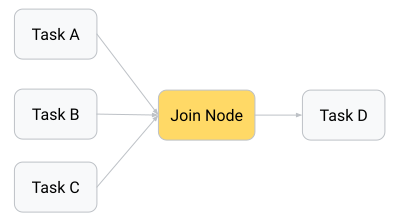
Figure 2. The output of parallel task nodes can be assembled using a JoinNode object.
The following code snippet shows how to implement a basic JoinNode object and use it to assemble output of all the nodes:
from google.adk.workflow import JoinNode
my_join_node = JoinNode(name="my_join_node")
edges=[
("START", parallel_task_A, my_join_node),
("START", parallel_task_B, my_join_node),
("START", parallel_task_C, my_join_node),
(my_join_node, final_task_D),
]
Caution: Stuck JoinNode from incomplete nodes
The JoinNode object proceeds only after all its upstream nodes have provided an Event output. If one of the upstream nodes fails to provide output, the JoinNode is stuck and workflow execution stops. Make sure to include failsafe output from any node that outputs to a JoinNode.
Nested workflows
When building more complex workflows, you may want to encapsulate the functionality for specific tasks into reusable workflows. One or more Workflow objects can be used as a node within the graph of another workflow agent to accomplish this goal.
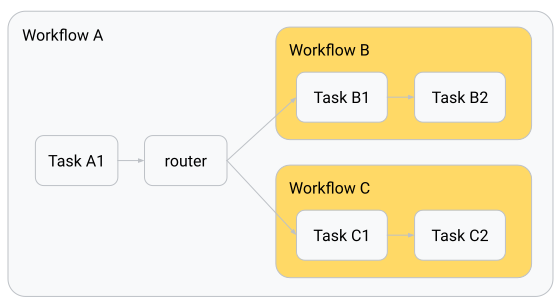
Figure 3. Nested Workflows as nodes inside a parent Workflow.
The following code snippet shows how to implement a workflow agent with two nested more Workflow objects (workflow_B, workflow_C) as nodes in the graph:
from google.adk import Workflow

root_agent = Workflow(
    name="parent_workflow",
    edges=[
       ("START", task_A1, router),
       (router, {
            "RUN_WORKFLOW_B": workflow_B,
            "RUN_WORKFLOW_C": workflow_C,
            },
       ),
    ],
)
Nested workflow data output
Output for nested Workflow objects works slightly differently from individual nodes. When the nested workflow completes one of its nodes, it transmits data to the next node in the nested workflow's graph and the system bubbles up the Event for that node to the parent workflow for process traceability. When the nested workflow completes the last node in its process, the parent node extracts data from the final leaf nodes and emits it as the output of the nested workflow.