Oracle Toolkit for GCP: User Guide
Table of Contents
- Oracle Toolkit for GCP: User Guide
- Table of Contents
- Command quick reference for single instance deployments
- Command quick reference for RAC deployments
- Command quick reference for DR deployments
- Command quick reference for Oracle Database Free Edition deployments
- Overview
- Installing the toolkit
- Downloading and staging the Oracle Software
- Prerequisite configuration
- Configuring Installations
- Example Toolkit Execution
- Oracle Database Free Edition Specific Details and Changes
- Post installation tasks
Command quick reference for single instance deployments
Sample commands for a simple quick-start and basic oracle-toolkit usage for an Oracle “single instance” database with Grid Infrastructure (and ASM). Refer to the remainder of this document for additional details and comprehensive explanations of the toolkit, scripting, options, and usage scenarios. All commands run from the “control node”.
NOTE: If deploying a single-instance database on GCE, refer to the Quickstart: Use Oracle Toolkit for Google Cloud with Compute Engine document for additional information on provisioning GCE infrastructure and getting started with this toolkit.
-
Validate media specifying GCS storage bucket and optionally database:
./check-swlib.sh --ora-swlib-bucket gs://[cloud-storage-bucket-name] \ --ora-version 19.3.0.0.0 -
Validate access to target server (optionally include -i and location of private key file):
ssh ${INSTANCE_SSH_USER:-`whoami`}@${INSTANCE_IP_ADDR} sudo -u root hostname -
Review oracle-toolkit parameters:
./install-oracle.sh --help -
Run an installation:
./install-oracle.sh \
--ora-swlib-bucket gs://[cloud-storage-bucket-name] \
--backup-dest "+RECO" \
--ora-swlib-path /u02/swlib/ \
--ora-swlib-type gcs \
--instance-ip-addr ${INSTANCE_IP_ADDR}
Command quick reference for RAC deployments
Sample installation for an Oracle Real Application Clusters (RAC) installation. Initial steps similar to those of the Single Instance installation.
-
Validate media specifying Cloud Storage bucket and optionally database version:
./check-swlib.sh --ora-swlib-bucket gs://[cloud-storage-bucket-name] --ora-version 19.3.0.0.0 -
Validate access to target RAC nodes:
ssh ${INSTANCE_SSH_USER:-`whoami`}@${INSTANCE_IP_ADDR_NODE_1} sudo -u root hostname ssh ${INSTANCE_SSH_USER:-`whoami`}@${INSTANCE_IP_ADDR_NODE_2} sudo -u root hostname -
Review optional oracle-toolkit parameters:
./install-oracle.sh --help -
Create the cluster configuration. You have two options:
- Edit the
cluster_config.jsonJSON file template that is provided with the toolkit, and then specify its path using the--cluster-configparameter - Pass the cluster configuration JSON as an argument to the
--cluster-config-jsonparameter
- Edit the
-
Install the database:
./install-oracle.sh \
--ora-swlib-bucket gs://[cloud-storage-bucket-name] \
--backup-dest "+RECO" \
--ora-swlib-path /u02/swlib/ \
--ora-swlib-type gcs \
--cluster-type RAC \
--cluster-config-json '[ { "scan_name": ... } ]'
Command quick reference for DR deployments
NOTE: For additional background and further details on implementing Oracle Database Disaster Recovery (DR) using this toolkit, see the complementary document Oracle Toolkit for Google Cloud - Disaster Recovery Configurations.
The primary database must exist before you can create a standby database.
When you create the primary database, omit the --cluster-type option or set it to NONE. To create the primary database, see Single Instance Deployments section.
To create a standby database, add the following options to the command options that you used to create the primary database:
--primary-ip-addr ${PRIMARY_IP_ADDR}--cluster-type DG
-
Install a standby database:
./install-oracle.sh \
--ora-swlib-bucket gs://[cloud-storage-bucket-name] \
--instance-ip-addr ${INSTANCE_IP_ADDR} \
--ora-swlib-path /u02/swlib/ \
--backup-dest "+RECO" \
--ora-swlib-type gcs \
--primary-ip-addr ${PRIMARY_IP_ADDR} \
--cluster-type DG
Command quick reference for Oracle Database Free Edition deployments
The toolkit supports installing the Oracle Database Free edition, which is downloadable from the Oracle website: Oracle Database Free Get Started.
Unlike with other Oracle Database editions, the Free edition is available in RPM package format only. Consequently, the associated Enterprise Linux pre-installation and database RPM files must be downloaded and staged in the GCS storage bucket.
-
Validate media specifying GCS storage bucket and specify
FREEas the database edition:./check-swlib.sh --ora-swlib-bucket gs://[cloud-storage-bucket-name] \ --ora-edition FREE -
Validate access to target server (optionally include -i and location of private key file):
ssh ${INSTANCE_SSH_USER:-`whoami`}@${INSTANCE_IP_ADDR} sudo -u root hostname -
Review oracle-toolkit parameters:
./install-oracle.sh --help -
Run an installation:
./install-oracle.sh \
--ora-edition FREE \
--ora-swlib-bucket gs://[cloud-storage-bucket-name] \
--backup-dest [backup-directory] \
--instance-ip-addr ${INSTANCE_IP_ADDR}
Overview
Oracle Toolkit for GCP provides an automated (scripted) mechanism to help you install Oracle software and configure an initial Oracle database on Google Cloud virtual machines or Bare Metal Solution servers. You can also use the toolkit to provision initial Oracle Database Recovery Manager (RMAN) backups to Google Cloud Storage or another storage system.
This guide is for experienced professional users of Oracle software who are deploying Oracle Database software and preparing initial Oracle databases on Google Cloud Bare Metal Solution, or on Google Cloud Compute Engine .
The toolkit defines default values for most options, so you can run the toolkit with only a few specifications. Your configuration options are listed later in this guide.
For additional information about using this toolkit on GCE virtual machines (instances) specifically, including details on infrastructure provisioning, refer to the Oracle Toolkit for Google Cloud - Compute Engine VM User Guide.
The toolkit supports the following major releases of Oracle Database and applies the most recent quarterly patches, also known as Oracle Release Updates or RUs:
- Oracle 11.2.0.4.0
- Oracle 12.1.0.2.0
- Oracle 12.2.0.1.0
- Oracle 18c
- Oracle 19c
- Oracle 21c
- Oracle 23ai/26ai
The toolkit does not include any Oracle software. You must obtain the appropriate licenses and download the Oracle software on your own. This guide provides information about where to obtain Oracle software solely for your convenience.
After downloading the Oracle software, you stage the software in a Cloud Storage bucket where the toolkit can access it.
Software Stack
The toolkit customizes the software stack for Oracle Database workloads. Any out of a number of Oracle Database software releases can be installed. In addition, the configuration of the software stack includes:
- The Oracle Grid Infrastructure (GI) and Automatic Storage Manager (ASM), at the same major release as the database software. (Optional)
- The configuration of Oracle resources, like the database, listener, and ASM resources, via “Oracle Restart” for single-instance deployments and Oracle Clusterware for RAC deployments.
- The optional separation of OS roles,”role separation,” so you can have different OS users for the GI and database software.
- The installation of all of the required OS packages that are necessary for the Oracle software installation, including common packages, such as ntp, bind-utils, unzip, expect, wget, and net-tools.
- The configuration of Linux Huge Pages, usually as a percentage of the available memory, and the disabling of Red Hat Transparent Huge Pages (THP), as per the recommended Oracle practices.
- The adjustment of Linux kernel settings, as necessary. For more information, see the Oracle documentation.
- The disabling of the Linux firewall and SELinux, as recommended for Oracle database servers.
- The creation of a swap device, as necessary.
You can further customize the environment and host server(s), as needed.
Requirements and Prerequisites
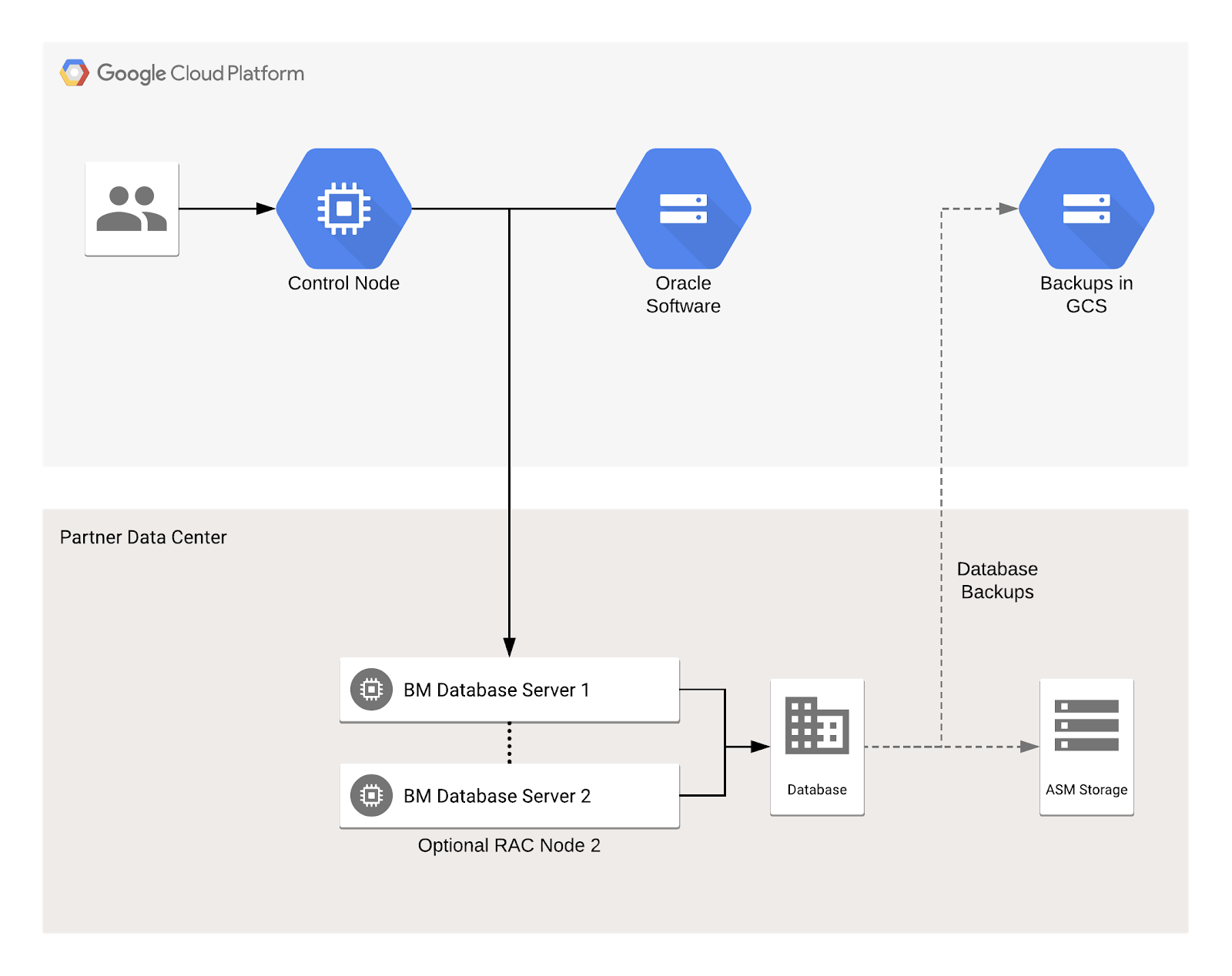
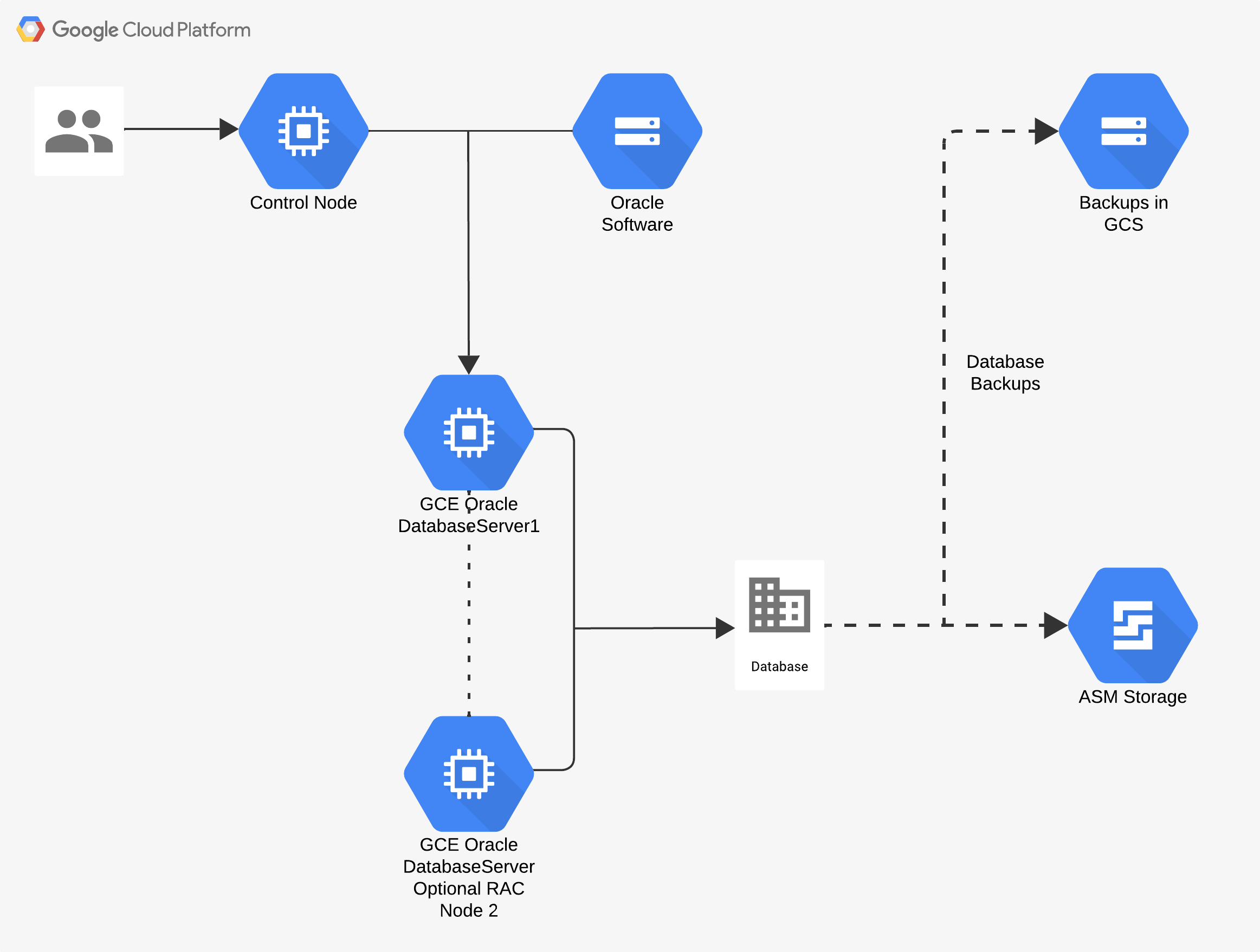
You need at least two servers to install Oracle software by using the toolkit:
- Control node: a virtual or physical machine from which the toolkit is executed.
- Database server(s): target where the Oracle software will be installed and configured.
A second database server (or node) is required for RAC deployments.
The following diagrams are similar, showing the architecture in both Bare Metal Solution and Google Cloud virtual machine environments
Control node requirements
The control node can be any server capable of ssh.
The control node must have the following software installed:
- Ansible version 2.9 or higher.
- If you are using a Cloud Storage bucket to stage your Oracle installation media, the Google Cloud SDK.
- Ideally, a mainstream Linux OS.
Depending on the Linux distribution you are using on your control node, you can
install Ansible with sudo apt-get install ansible. Your installation command
might be different. You can verify your version of Ansible with ansible
--version.
You can use the Google Cloud Shell as your control node. Cloud Shell provides command-line access to a virtual machine instance in a terminal window that opens in the web console. The latest version of Cloud SDK is installed for you.
Target server requirements
Prior to running the toolkit, ensure that the control node has SSH access to a
Linux user account on the target server. The user account must have elevated
security privileges, such as granted by “sudo su -“, to install and configure
Oracle software. The toolkit creates Oracle software owners, such as oracle
and grid.
The target database server(s) must be running a version of Linux that is certified for Oracle Database. The toolkit currently supports the following certified OS versions:
- Red Hat Enterprise Linux (RHEL) 7 and 8 (versions 7.3 and up).
- Oracle Linux (OL) 7 and 8 (versions 7.3 and up).
For more information about Oracle-supported platforms see the Oracle certification matrix in the “My Oracle Support” (MOS) site (sign in required): https://support.oracle.com.
Installing the toolkit
The latest version of the toolkit can be downloaded from GitHub: https://github.com/google/oracle-toolkit
On the google/oracle-toolkit home page in GitHub, download the toolkit to your
control node by clicking the Clone or Download button and selecting
Download zip.
If you are using the Cloud Shell as your control node, download the tool to your $HOME directory.
Downloading and staging the Oracle Software
You must download and stage the Oracle software yourself, in accordance with the applicable licenses governing such software. The toolkit doesn’t contain any Oracle software. You are responsible for procuring the Oracle software that you need and for complying with the applicable licenses.
If you are deploying the Oracle Database Free edition, downloading and staging
the software is optional. Doing so may be useful in cases where the database VM
has no direct internet access. Alternatively, the required Free edition RPMs
can be downloaded directly from oracle.com, based on the values set in the
Ansible rdbms_software variable. For more information, see the
Free Edition Version Details section.
Downloading the Oracle installation software
Oracle software is divided into two general categories: base software that you download from the Oracle Software Delivery Cloud site (also known as Oracle “eDelivery”) or Oracle Technology Network (also known as OTN), and patches that you download from Oracle’s My Oracle Support (MOS) site.
One key exception: Oracle 11g base software can be downloaded directly from My Oracle Support. Only Oracle 12c or later base software needs to be downloaded from Oracle Software Delivery Cloud. Direct links to MOS downloads are provided below.
Before you download Oracle software and patches, review and acknowledge Oracle’s license terms.
Before using the toolkit, download all the software pieces for your Oracle
release, including the base release, patch sets, the OPatch utility, and any
additional patches listed by Oracle (unless using --no-patch, at which
point only the base release is installed).
Do not unzip the downloaded installation files. The toolkit requires the downloads in their original, compressed-file format.
Downloading Patches from My Oracle Support
For convenience, direct links to My Oracle Support (MOS) for applicable patches are listed in the following section. You need an Oracle Single Sign-on account that is linked to a valid Oracle Customer Support Identifier (CSI) to download patches through My Oracle Support.
Required Oracle Software - Download Summary
| Oracle Release | Category - Site | Software Piece | File Name (From "Oracle eDelivery" or "My Oracle Support") |
|---|---|---|---|
| 23.26.1.0.0 | Base - eDelivery or OTN | Oracle Database 23.26.1.0.0 for Linux x86-64 | V1054592-01.zip or LINUX.X64_2326100_db_home.zip |
| Base - eDelivery or OTN | Oracle Grid Infrastructure 23.26.1.0.0 for Linux x86-64 | V1054596-01.zip or LINUX.X64_2326100_grid_home.zip | |
| 21.3.0.0.0 | Base - eDelivery or OTN | Oracle Database 21.3.0.0.0 for Linux x86-64 | V1011496-01.zip or LINUX.X64_213000_db_home.zip |
| Patch - MOS | Database Release Update 21.8.0.0.0 | p34527084_210000_Linux-x86-64.zip | |
| Database Release Update 21.9.0.0.0 | p34839741_210000_Linux-x86-64.zip | ||
| Database Release Update 21.10.0.0.0 | p35134934_210000_Linux-x86-64.zip | ||
| Database Release Update 21.11.0.0.0 | p35428978_210000_Linux-x86-64.zip | ||
| Database Release Update 21.12.0.0.0 | p35740258_210000_Linux-x86-64.zip | ||
| Database Release Update 21.13.0.0.0 | p36041222_210000_Linux-x86-64.zip | ||
| Database Release Update 21.14.0.0.0 | p36352352_210000_Linux-x86-64.zip | ||
| Database Release Update 21.15.0.0.0 | p36696242_210000_Linux-x86-64.zip | ||
| Database Release Update 21.16.0.0.0 | p36991631_210000_Linux-x86-64.zip | ||
| Database Release Update 21.17.0.0.0 | p37350281_210000_Linux-x86-64.zip | ||
| Database Release Update 21.18.0.0.0 | p37655430_210000_Linux-x86-64.zip | ||
| Database Release Update 21.22.0.0.0 | p39073698_210000_Linux-x86-64.zip | ||
| Database Release Update 21.23.0.0.0 | p39549189_210000_Linux-x86-64.zip | ||
| Database Release Update 21.24.0.0.0 | p40017330_210000_Linux-x86-64.zip | ||
| Base - eDelivery or OTN | Oracle Grid Infrastructure 21.3.0.0.0 for Linux x86-64 | V1011504-01.zip or LINUX.X64_213000_grid_home.zip | |
| Patch - MOS | GI Release Update 21.8.0.0.0 | p34526142_210000_Linux-x86-64.zip | |
| GI Release Update 21.9.0.0.0 | p34838415_210000_Linux-x86-64.zip | ||
| GI Release Update 21.10.0.0.0 | p35132566_210000_Linux-x86-64.zip | ||
| GI Release Update 21.11.0.0.0 | p35427907_210000_Linux-x86-64.zip | ||
| GI Release Update 21.12.0.0.0 | p35738010_210000_Linux-x86-64.zip | ||
| GI Release Update 21.13.0.0.0 | p36031790_210000_Linux-x86-64.zip | ||
| GI Release Update 21.14.0.0.0 | p36352207_210000_Linux-x86-64.zip | ||
| GI Release Update 21.15.0.0.0 | p36696109_210000_Linux-x86-64.zip | ||
| GI Release Update 21.16.0.0.0 | p36990664_210000_Linux-x86-64.zip | ||
| GI Release Update 21.17.0.0.0 | p37349593_210000_Linux-x86-64.zip | ||
| GI Release Update 21.18.0.0.0 | p37642955_210000_Linux-x86-64.zip | ||
| GI Release Update 21.22.0.0.0 | p39073631_210000_Linux-x86-64.zip | ||
| GI Release Update 21.24.0.0.0 | p40017336_210000_Linux-x86-64.zip | ||
| OPatch Utility | p6880880_210000_Linux-x86-64.zip | ||
| 19.3.0.0.0 | Base - eDelivery or OTN | Oracle Database 19.3.0.0.0 for Linux x86-64 | V982063-01.zip or LINUX.X64_193000_db_home.zip |
| Oracle Grid Infrastructure 19.3.0.0.0 for Linux x86-64 | V982068-01.zip or LINUX.X64_193000_grid_home.zip | ||
| Patch - MOS | COMBO OF OJVM RU COMPONENT 19.33.0.0.261020 + GI RU 19.33.0.0.261020 | p40121665_190000_Linux-x86-64.zip | |
| Patch - MOS | COMBO OF OJVM RU COMPONENT 19.32.0.0.260721 + GI RU 19.32.0.0.260721 | p39618711_190000_Linux-x86-64.zip | |
| Patch - MOS | COMBO OF OJVM RU COMPONENT 19.31.0.0.260421 + GI RU 19.31.0.0.260421 | p39062956_190000_Linux-x86-64.zip | |
| Patch - MOS | COMBO OF OJVM RU COMPONENT 19.30.0.0.260120 + GI RU 19.30.0.0.260120 | p38658588_190000_Linux-x86-64.zip | |
| Patch - MOS | COMBO OF OJVM RU COMPONENT 19.29.0.0.251021 + GI RU 19.29.0.0.251021 | p38273558_190000_Linux-x86-64.zip | |
| Patch - MOS | COMBO OF OJVM RU COMPONENT 19.28.0.0.250715 + GI RU 19.28.0.0.250715 | p37952382_190000_Linux-x86-64.zip | |
| Patch - MOS | COMBO OF OJVM RU COMPONENT 19.27.0.0.250415 + GI RU 19.27.0.0.250415 | p37591516_190000_Linux-x86-64.zip | |
| Patch - MOS | COMBO OF OJVM RU COMPONENT 19.26.0.0.250121 + GI RU 19.26.0.0.250121 | p37262208_190000_Linux-x86-64.zip | |
| Patch - MOS | COMBO OF OJVM RU COMPONENT 19.25.0.0.241015 + GI RU 19.25.0.0.241015 | p36866740_190000_Linux-x86-64.zip | |
| Patch - MOS | COMBO OF OJVM RU COMPONENT 19.24.0.0.240716 + GI RU 19.24.0.0.240716 | p36522439_190000_Linux-x86-64.zip | |
| Patch - MOS | COMBO OF OJVM RU COMPONENT 19.23.0.0.240416 + GI RU 19.23.0.0.240416 | p36209493_190000_Linux-x86-64.zip | |
| COMBO OF OJVM RU COMPONENT 19.22.0.0.240116 + GI RU 19.22.0.0.240116 | p36031453_190000_Linux-x86-64.zip | ||
| COMBO OF OJVM RU COMPONENT 19.21.0.0.231017 + GI RU 19.21.0.0.231017 | p35742441_190000_Linux-x86-64.zip | ||
| COMBO OF OJVM RU COMPONENT 19.13.0.0.211019 + GI RU 19.13.0.0.211019 | p33248471_190000_Linux-x86-64.zip | ||
| COMBO OF OJVM RU COMPONENT 19.11.0.0.210420 + GI RU 19.11.0.0.210420 | p32578973_190000_Linux-x86-64.zip | ||
| COMBO OF OJVM RU COMPONENT 19.10.0.0.210119 + GI RU 19.10.0.0.210119 | p32126842_190000_Linux-x86-64.zip | ||
| COMBO OF OJVM RU COMPONENT 19.9.0.0.201020 + GI RU 19.9.0.0.201020 | p31720429_190000_Linux-x86-64.zip | ||
| COMBO OF OJVM RU COMPONENT 19.8.0.0.200714 + GI RU 19.8.0.0.200714 | p31326369_190000_Linux-x86-64.zip | ||
| COMBO OF OJVM RU COMPONENT 19.7.0.0.200414 + GI RU 19.7.0.0.200414 | p30783556_190000_Linux-x86-64.zip | ||
| COMBO OF OJVM RU COMPONENT 19.6.0.0.200114 GI RU 19.6.0.0.200114 | p30463609_190000_Linux-x86-64.zip | ||
| COMBO OF OJVM RU COMPONENT 19.5.0.0.191015 GI RU 19.5.0.0.191015 | p30133178_190000_Linux-x86-64.zip | ||
| COMBO OF OJVM RU COMPONENT 19.4.0.0.190716 + GI RU 19.4.0.0.190716 | p29699097_190000_Linux-x86-64.zip | ||
| OPatch Utility | p6880880_190000_Linux-x86-64.zip | ||
| 18.0.0.0.0 | Base - eDelivery | Oracle Database 18.0.0.0.0 for Linux x86-64 | V978967-01.zip |
| Oracle Grid Infrastructure 18.0.0.0.0 for Linux x86-64 | V978971-01.zip | ||
| Patch - MOS | COMBO OF OJVM RU COMPONENT 18.14.0.0.210420 + GI RU 18.14.0.0.210420 | p32579024_180000_Linux-x86-64.zip | |
| COMBO OF OJVM RU COMPONENT 18.13.0.0.210119 + GI RU 18.13.0.0.210119 | p32126862_180000_Linux-x86-64.zip | ||
| COMBO OF OJVM RU COMPONENT 18.12.0.0.201020 + GI RU 18.12.0.0.201020 | p31720457_180000_Linux-x86-64.zip | ||
| COMBO OF OJVM RU COMPONENT 18.11.0.0.200714 + GI RU 18.11.0.0.200714 | p31326376_180000_Linux-x86-64.zip | ||
| COMBO OF OJVM RU COMPONENT 18.10.0.0.200414 GI RU 18.10.0.0.200414 | p30783607_180000_Linux-x86-64.zip | ||
| COMBO OF OJVM RU COMPONENT 18.9.0.0.200114 GI RU 18.9.0.0.200114 | p30463635_180000_Linux-x86-64.zip | ||
| COMBO OF OJVM RU COMPONENT 18.8.0.0.191015 GI RU 18.8.0.0.191015 | p30133246_180000_Linux-x86-64.zip | ||
| COMBO OF OJVM RU COMPONENT 18.7.0.0.190716 + GI RU 18.7.0.0.190716 | p29699160_180000_Linux-x86-64.zip | ||
| COMBO OF OJVM RU COMPONENT 18.6.0.0.190416 + GI RU 18.6.0.0.190416 | p29251992_180000_Linux-x86-64.zip | ||
| OPatch Utility | p6880880_180000_Linux-x86-64.zip | ||
| 12.2.0.1.0 | Base - eDelivery | Oracle Database 12.2.0.1.0 for Linux x86-64 | V839960-01.zip |
| Oracle Grid Infrastructure 12.2.0.1.0 for Linux x86-64 for Linux x86-64 | V840012-01.zip | ||
| Patch - MOS | COMBO OF OJVM RU COMPONENT 12.2.0.1.220118 + 12.2.0.1.220118 GIJAN2022RU | p33559966_122010_Linux-x86-64.zip | |
| Patch - MOS | COMBO OF OJVM RU COMPONENT 12.2.0.1.211019 + 12.2.0.1.211019 GIOCT2021RU | p33248546_122010_Linux_Linux-x86-64.zip | |
| COMBO OF OJVM RU COMPONENT 12.2.0.1.210420 + 12.2.0.1.210420 GIAPR2021RU | p32579057_122010_Linux-x86-64.zip | ||
| COMBO OF OJVM RU COMPONENT 12.2.0.1.210119 + 12.2.0.1.210119 GIJAN2021RU | p32126883_122010_Linux-x86-64.zip | ||
| COMBO OF OJVM RU COMPONENT 12.2.0.1.201020 + 12.2.0.1.201020 GIOCT2020RU | p31720486_122010_Linux-x86-64.zip | ||
| COMBO OF OJVM RU COMPONENT 12.2.0.1.200714 + 12.2.0.1.200714 GIJUL2020RU | p31326390_122010_Linux-x86-64.zip | ||
| COMBO OF OJVM RU COMPONENT 12.2.0.1.200414 12.2.0.1.200414 GIAPR2020RU | p30783652_122010_Linux-x86-64.zip | ||
| COMBO OF OJVM RU COMPONENT 12.2.0.1.200114 12.2.0.1.200114 GIJAN2020RU | p30463673_122010_Linux-x86-64.zip | ||
| COMBO OF OJVM RU COMPONENT 12.2.0.1.191015 12.2.0.1.191015 GIOCT2019RU | p30133386_122010_Linux-x86-64.zip | ||
| COMBO OF OJVM RU COMPONENT 12.2.0.1.190716 + 12.2.0.1.190716 GIJUL2019RU | p29699173_122010_Linux-x86-64.zip | ||
| COMBO OF OJVM RU COMPONENT 12.2.0.1.190416 + 12.2.0.1.190416 GIAPR2019RU | p29252072_122010_Linux-x86-64.zip | ||
| ACFS MODULE ORACLEACFS.KO FAILS TO LOAD ON OL7U3 SERVER WITH RHCK (Patch) patch 25078431 for Linux x86-64 | p25078431_122010_Linux-x86-64.zip | ||
| OPatch Utility | p6880880_122010_Linux-x86-64.zip | ||
| 12.1.0.2.0 | Base - eDelivery | Oracle Database 12.1.0.2.0 for Linux x86-64 | V46095-01_1of2.zip V46095-01_2of2.zip |
| Oracle Database 12c Standard Edition 2 12.1.0.2.0 for Linux x86-64 | V77388-01_1of2.zip V77388-01_2of2.zip |
||
| Oracle Grid Infrastructure 12.1.0.2.0 for Linux x86-64 | V46096-01_1of2.zip V46096-01_2of2.zip |
||
| Patch - MOS | COMBO OF OJVM COMPONENT 12.1.0.2.220719 DB PSU + GIPSU 12.1.0.2.220719 | p34163645_121020_Linux-x86-64.zip | |
| Patch - MOS | COMBO OF OJVM COMPONENT 12.1.0.2.220419 DB PSU + GIPSU 12.1.0.2.220419 | p33859511_121020_Linux-x86-64.zip | |
| Patch - MOS | COMBO OF OJVM COMPONENT 12.1.0.2.220118 DB PSU + GIPSU 12.1.0.2.220118 | p33560011_121020_Linux-x86-64.zip | |
| Patch - MOS | COMBO OF OJVM COMPONENT 12.1.0.2.211019 DB PSU + GIPSU 12.1.0.2.211019 | p33248580_121020_Linux-x86-64.zip | |
| COMBO OF OJVM COMPONENT 12.1.0.2.201020 DB PSU + GIPSU 12.1.0.2.201020 | p31720761_121020_Linux-x86-64.zip | ||
| COMBO OF OJVM COMPONENT 12.1.0.2.200714 DB PSU + GIPSU 12.1.0.2.200714 | p31326400_121020_Linux-x86-64.zip | ||
| COMBO OF OJVM COMPONENT 12.1.0.2.200414 DB PSU GIPSU 12.1.0.2.200414 | p30783882_121020_Linux-x86-64.zip | ||
| COMBO OF OJVM COMPONENT 12.1.0.2.200114 DB PSU GIPSU 12.1.0.2.200114 | p30463691_121020_Linux-x86-64.zip | ||
| COMBO OF OJVM COMPONENT 12.1.0.2.191015 DB PSU GIPSU 12.1.0.2.191015 | p30133443_121020_Linux-x86-64.zip | ||
| COMBO OF OJVM COMPONENT 12.1.0.2.190716 DB PSU + GIPSU 12.1.0.2.190716 | p29699244_121020_Linux-x86-64.zip | ||
| COMBO OF OJVM COMPONENT 12.1.0.2.190416 DB PSU + GIPSU 12.1.0.2.190416 | p29252164_121020_Linux-x86-64.zip | ||
| Combo OJVM PSU 12.1.0.2.190416 and Database Proactive BP 12.1.0.2.190416 patch 29252171 for Linux x86-64 | p29252171_121020_Linux-x86-64.zip | ||
| GI PSU 12.1.0.2.190416 patch 29176115 for Linux x86-64 | p29176115_121020_Linux-x86-64.zip | ||
| OPatch Utility | p6880880_121010_Linux-x86-64.zip | ||
| 11.2.0.4 | Patch - MOS | 11.2.0.4.0 PATCH SET FOR ORACLE DATABASE SERVER - Patch 13390677 for Linux x86-64 | p13390677_112040_Linux-x86-64_1of7.zip p13390677_112040_Linux-x86-64_2of7.zip |
| 11.2.0.4.0 PATCH SET FOR ORACLE DATABASE SERVER - Patch 13390677 for Linux x86-64 | p13390677_112040_Linux-x86-64_3of7.zip | ||
| Combo of OJVM Component 11.2.0.4.201020 DB PSU + GI PSU 11.2.0.4.201020 | p31720783_112040_Linux-x86-64.zip | ||
| Combo of OJVM Component 11.2.0.4.200714 DB PSU + GI PSU 11.2.0.4.200714 | p31326410_112040_Linux-x86-64.zip | ||
| COMBO OF 11.2.0.4.200414 OJVM PSU GIPSU 11.2.0.4.200414 | p30783890_112040_Linux-x86-64.zip | ||
| GRID INFRASTRUCTURE PATCH SET UPDATE 11.2.0.4.200114 | p30501155_112040_Linux-x86-64.zip | ||
| GRID INFRASTRUCTURE PATCH SET UPDATE 11.2.0.4.191015 | p30070097_112040_Linux-x86-64.zip | ||
| GRID INFRASTRUCTURE PATCH SET UPDATE 11.2.0.4.190716 | p29698727_112040_Linux-x86-64.zip | ||
| GRID INFRASTRUCTURE PATCH SET UPDATE 11.2.0.4.190416 | p29255947_112040_Linux-x86-64.zip | ||
| Combo OJVM PSU 11.2.0.4.190416 and Database PSU 11.2.0.4.190416 patch 29252186 for Linux x86-64 | p29252186_112040_Linux-x86-64.zip | ||
| GI PSU 11.2.0.4.190416 patch 29255947 for Linux x86-64 | p29255947_112040_Linux-x86-64.zip | ||
| RC SCRIPTS (/ETC/RC.D/RC.* , /ETC/INIT.D/* ) ON OL7 FOR CLUSTERWARE (Patch) patch 18370031 for Linux x86-64 | p18370031_112040_Linux-x86-64.zip | ||
| OPatch Utility | p6880880_112000_Linux-x86-64.zip |
If the required software components are not properly downloaded and staged, the oracle-toolkit will fail.
Staging the Oracle installation media
You can stage the Oracle installation media in any one of the following repository types:
- A Cloud Storage bucket.
- Cloud Storage FUSE, an open source FUSE adapter that allows you to mount Cloud Storage buckets as file systems on Linux or macOS systems.
- A network NFS share.
Cloud Storage bucket
If you stage your installation media in a Cloud Storage bucket, the toolkit
will copy the required files to the software library path location on your
target server using the Google Cloud CLI gcloud storage command. Either
directly downloading the files on the target server or by transferring them
through your Ansible Control Node. Consequently, the CLI must be installed on
your Ansible Control Node or the target server. To install, refer to Install
the gcloud CLI.
When the --ora-swlib-type argument is used and set to GCSDIRECT, the
toolkit will directly copy the media from the GCS bucket to the library path
on the target server. This direct copy requires the gcloud utility to be
available and the storage bucket accessible from the target server. This is
often the most performant method for copying media from storage buckets.
If the argument value is GCSTRANSFER, the toolkit will instead copy the
media files through your Ansible Control Node. This method also uses the
gcloud command, but runs it from your Ansible Control Node. And still
writes the contents to the software library path on the target server.
When the argument value is GCS or is not provided, the toolkit will
determine which method to use. If the gcloud utility is available on the
target server and the GCS bucket is accessible from it, the direct method will
be used. Otherwise, if either condition is not met, the toolkit will revert to
the transfer method.
Cloud Storage FUSE
With Cloud Storage FUSE, you can also pass the location of a Cloud Storage service account json file. This is useful if your control node doesn’t have a proper instance service account. You should also confirm that the service account scopes allow you to use Cloud Storage.
To create a new service account:
- Navigate to your Google Cloud Console.
- Select the IAM & Admin tab > Service accounts.
- Click on Create Service Account and chose a relevant name.
- Select a role that provides the permission that you need, such as Storage Admin.
- Click on the “Create Key” button, and download the file in JSON format.
You can then pass the file as a parameter to the deployment:
--ora-swlib-type gcsfuse --ora-swlib-bucket oracle-swlib --ora-swlib-credentials ~/path_to/service_account.json
The toolkit uploads the service account to the server so that Cloud Storage FUSE can use it.
NFS share
When you use an NFS share, you specify the NFS mount point on the
ora-swlib-bucket parameter:
--ora-swlib-type nfs --ora-swlib-bucket 192.168.0.250:/my_nfs_export
Validating Media
You can validate that you have correctly staged all of the required installation
files by using the check-swlib.sh script, which validates the files based
on name, size, and MD5 message digest. To validate the media, specify the GCS
software bucket where the software is staged and the Oracle software version
that you are installing. The version default is 19.3.0.0.0.
Example of a successful media validation:
$ ./check-swlib.sh --ora-swlib-bucket gs://oracle-software --ora-version 19.3.0.0.0

Running with parameters from command line or environment variables:

ORA_SWLIB_BUCKET=gs://oracle-software
ORA_VERSION=19.3.0.0.0

Found V982063-01.zip : Oracle Database 19.3.0.0.0 for Linux x86-64
        file size matches (3059705302), md5 matches (1858bd0d281c60f4ddabd87b1c214a4f).

Found V982068-01.zip : Oracle Grid Infrastructure 19.3.0.0.0 for Linux x86-64
        file size matches (2889184573), md5 matches (b7c4c66f801f92d14faa0d791ccda721).

Found p29859737_190000_Linux-x86-64.zip : Oracle 19c DB RU patch 29859737 for Linux x86-64
        file size matches (498214157), md5 matches (3b017f517341df5b35e9fbd90f1f49aa).

Found p29800658_190000_Linux-x86-64.zip : Oracle 19c GI RU patch 29800658 for Linux x86-64
        file size matches (1365811472), md5 matches (13c0041a5ea7eb9fad4725d2136da627).

Found p29699097_190000_Linux-x86-64.zip : COMBO OF OJVM RU COMPONENT 19.4.0.0.190716 + GI RU 19.4.0.0.190716
        file size matches (1986870968), md5 matches (2206c8a2431eb6fa0c4f7dd5aa7a58b2).

Found p30133178_190000_Linux-x86-64.zip : COMBO OF OJVM RU COMPONENT 19.5.0.0.191015 GI RU 19.5.0.0.191015
        file size matches (2004604850), md5 matches (4189caeae850a7c4191fdd3fa4c0af6a).

Found p30463609_190000_Linux-x86-64.zip : COMBO OF OJVM RU COMPONENT 19.6.0.0.200114 GI RU 19.6.0.0.200114
        file size matches (2308492999), md5 matches (0b2f7ae16f623e8d26905ae7ba600b06).

Found p6880880_190000_Linux-x86-64.zip : OPatch Utility
        file size matches (111682884), md5 matches (ad583938cc58d2e0805f3f9c309e7431).
Example of a failed media validation:
$ ./check-swlib.sh --ora-swlib-bucket gs://oracle-software --ora-version 12.2.0.1.0
Running with parameters from command line or environment variables:

ORA_SWLIB_BUCKET=gs://oracle-software
ORA_VERSION=12.2.0.1.0

Found V839960-01.zip : Oracle Database 12.2.0.1.0 for Linux x86-64
        file size matches (3453696911), md5 matches (1841f2ce7709cf909db4c064d80aae79).

Found V840012-01.zip : Oracle Grid Infrastructure 12.2.0.1.0 for Linux x86-64 for Linux x86-64
        file size matches (2994687209), md5 matches (ac1b156334cc5e8f8e5bd7fcdbebff82).

Found p29252035_122010_Linux-x86-64.zip : Combo Of OJVM Update Component 12.2.0.1.190416 + DB Update 12.2.0.1.190416 patch 29252035 for Linux x86-64
        file size matches (514033994), md5 matches (1a645dd57d06795a966a8882cc59243e).

Found p29301687_122010_Linux-x86-64.zip : Grid Infrastructure Release Update 12.2.0.1.190416 patch 29301687 for Linux x86-64
        file size matches (1736326653), md5 matches (1648e66220987dae6ecd757bc9f424ba).

Found p25078431_122010_Linux-x86-64.zip : ACFS MODULE ORACLEACFS.KO FAILS TO LOAD ON OL7U3 SERVER WITH RHCK (Patch) patch 25078431 for Linux x86-64
        file size matches (537299043), md5 matches (84ad563860b583fdd052bca0dcc33939).

Object gs://oracle-software/p29252072_122010_Linux-x86-64.zip COMBO OF OJVM RU COMPONENT 12.2.0.1.190416 + 12.2.0.1.190416 GIAPR2019RU not found: CommandException: One or more URLs matched no objects.

Found p29699173_122010_Linux-x86-64.zip : COMBO OF OJVM RU COMPONENT 12.2.0.1.190716 + 12.2.0.1.190716 GIJUL2019RU
        file size matches (2096740052), md5 matches (d5955b2e975752d3cd164a3e7db9aaaf).

Found p30133386_122010_Linux-x86-64.zip : COMBO OF OJVM RU COMPONENT 12.2.0.1.191015 12.2.0.1.191015 GIOCT2019RU
        file size matches (1925393453), md5 matches (25c30defbcc6e470e574fb3e16abb1d2).

Found p30463673_122010_Linux-x86-64.zip : COMBO OF OJVM RU COMPONENT 12.2.0.1.200114 12.2.0.1.200114 GIJAN2020RU
        file size matches (2135739707), md5 matches (04e26701ecdf04898abe363cdbeaaa40).

Found p6880880_122010_Linux-x86-64.zip : OPatch Utility
        size does not match (remote: 118408624, expected: 111682884), md5 does not match (remote: b8e1367997544ab2790c5bcbe65ca805, expected: ad583938cc58d2e0805f3f9c309e7431).
Prerequisite configuration
Create JSON formatted configurations for the data mount devices and optionally the ASM disk group. They can be stored in files or passed via CLI parameters.
The host provisioning tool can configure newly-provisioned BMS hosts to run the toolkit installer, including authentication, Internet access, and local mount points.
Data mount configuration
In the data mount configuration, you specify disk device attributes for:
- Oracle software installation, which is usually mounted at
/u01 - Oracle diagnostic destination, which is usually mounted at
/u02
Specify the block devices (actual devices, not partitions), the mount point names, the file system types, and the mount options in valid JSON format.
When you run the toolkit, specify the path to the configuration file by using
the --ora-data-mounts command line option. The file path can be relative or
fully qualified. The file name defaults to data_mounts_config.json.
Alternatively, pass the file content directly as JSON using --ora-data-mounts-json parameter.
If both are present, --ora-data-mounts-json takes precedence.
The following example shows a properly formatted JSON data mount configuration file:
[
  {
    "purpose": "software",
    "blk_device": "/dev/mapper/3600a098038314352502b4f782f446138",
    "name": "u01",
    "fstype": "xfs",
    "mount_point": "/u01",
    "mount_opts": "nofail"
  },
  {
    "purpose": "diag",
    "blk_device": "/dev/mapper/3600a098038314352502b4f782f446230",
    "name": "u02",
    "fstype": "xfs",
    "mount_point": "/u02",
    "mount_opts": "nofail"
  }
]
ASM disk group configuration
Installing Grid Infrastructure and using ASM is the default, but is not
mandatory. Whether GI is installed and ASM used is based on the value of the
--ora-disk-mgmt command line option.
Specify ASMLIB to use the Oracle ASMLib library or ASMUDEV to use ASM
with the Linux Udev device manager. ASMUDEV is the default.
In the ASM disk group configuration, specify the disk group names, the disk names, and the associated block devices (the actual devices, not partitions) in a valid JSON format.
When you run the toolkit, specify the path to the configuration file by using
the --ora-asm-disks command line option. The file path can be relative or fully qualified. The file
name defaults to ask_disk_config.json. Alternatively, pass the file content directly
as a JSON using --ora-asm-disks-json parameter. If both are present,
--ora-asm-disks-json takes precedence.
The following example shows a properly formatted JSON ASM disk group configuration file:
[
  {
    "diskgroup": "DATA",
    "disks": [
      { "name": "DATA_1234567538", "blk_device": "/dev/mapper/3600a098038314344382b4f1234567538" },
      { "name": "DATA_123456752D", "blk_device": "/dev/mapper/3600a098038314344382b4f123456752d" },
      { "name": "DATA_1234567541", "blk_device": "/dev/mapper/3600a098038314344382b4f1234567541" },
      { "name": "DATA_1234567542", "blk_device": "/dev/mapper/3600a098038314344382b4f1234567542" },
      { "name": "DATA_1234567543", "blk_device": "/dev/mapper/3600a098038314344382b4f1234567543" },
      { "name": "DATA_1234567544", "blk_device": "/dev/mapper/3600a098038314344382b4f1234567544" }
    ]
  },
  {
    "diskgroup": "RECO",
    "disks": [
      { "name": "RECO_1234567546", "blk_device": "/dev/mapper/3600a098038314344382b4f1234567546" },
      { "name": "RECO_1234567547", "blk_device": "/dev/mapper/3600a098038314344382b4f1234567547" },
      { "name": "RECO_1234567548", "blk_device": "/dev/mapper/3600a098038314344382b4f1234567548" }
    ]
  }
]
Installation using Linux file systems (without Grid Infrastructure and ASM)
Installing and creating databases that use XFS Linux file systems for database
storage is also possible. To use Linux file systems, include the
--ora-disk-mgmt FS command line option.
When disk management is set to FS, the Grid Infrastrure software is not
installed.
If required, add additional block devices to be formatted and used to the data mounts JSON. For example:
[
  {
    "purpose": "software",
    "blk_device": "/dev/disk/by-id/google-oracle-disk-1",
    "name": "u01",
    "fstype": "xfs",
    "mount_point": "/u01",
    "mount_opts": "nofail"
  },
  {
    "purpose": "data",
    "blk_device": "/dev/disk/by-id/google-oracle-data-1",
    "name": "u02",
    "fstype": "xfs",
    "mount_point": "/u02",
    "mount_opts": "nofail"
  },
  {
    "purpose": "reco",
    "blk_device": "/dev/disk/by-id/google-oracle-reco-1",
    "name": "u03",
    "fstype": "xfs",
    "mount_point": "/u03",
    "mount_opts": "nofail"
  }
]
Other installation script parameters such as --ora-data-destination,
--ora-reco-destination, or --backup-dest can then reference these Linux
mount points.
Example installation command using Linux file systems for all storage:
./install-oracle.sh \
  --instance-ip-addr ${INSTANCE_IP_ADDR} \
  --ora-version 19 \
  --ora-swlib-bucket gs://[cloud-storage-bucket-name] \
  --ora-disk-mgmt FS \
  --ora-data-mounts data_mounts_config.json \
  --ora-data-destination "/u02/app/oracle/oradata" \
  --ora-reco-destination "/u03/app/oracle/fast_recovery_area" \
  --backup-dest "/u04/app/oracle/backups"
Specifying LVM logical volumes
In addition to the raw devices, you can also specify LVM logical volumes by using the following format:
"blk_device": "/dev/mapper/oracle-data"
Configuring Installations
You run the toolkit by using the install-oracle.sh shell script.
IMPORTANT: From the control node, run the toolkit shell scripts by using a Linux user account that has the necessary SSH permissions and privileges on the target database server(s).
You need to specify the Cloud Storage bucket that contains the Oracle software and the backup destination for an initial RMAN backup. Running with the –help argument displays the list of available options.
Although the toolkit provides defaults for just about everything, in most cases, you need to customize your installation to some degree. Your customizations can range from simple items, such as the name of a database or the associated database edition, to less frequently adjusted items, such as ASM disk groups configurations. Regardless, the toolkit allows you to specify overrides for most configuration parameters.
As well as creating the initial database, the toolkit implements and schedules a simple RMAN backup script. You can adjust the backup parameters either before or after running the toolkit, as required.
Configuration defaults
Most parameters have default values, so you only need to specify them when you need a different value. The parameter values that the toolkit uses are echoed during execution so you can confirm the configuration.
The complete list of parameters and their values are provided in the Parameters section.
Oracle User Directories
The Oracle convention for naming of file system mounts is /pm, where p is a string constant and m is a unique key, typically a two digit integer. The standard string constant for Oracle user file system mounts is the letter “u”.
Following this convention, the toolkit creates the following default file system mounts:
-
/u01 - For Oracle software. For example, /u01/app/oracle/product.
-
/u02 - For other Oracle files, including software staging and, optionally, the Oracle Automatic Diagnostic Repository (ADR).
You don’t have to use a separate file system, physical device, or logical volume for the software staging and other purposes. You can use the single file system, /u01, or whatever you choose to call it, if you want to.
Database backup configuration
As a part of installation, the toolkit creates an initial RMAN full database backup, an archived redo log backup, and sets the initial backup schedule based on your specifications or the default backup values.
The parameters for configuring your backups are described in Backup configuration parameters. The following list shows the default backup configuration implemented by the toolkit:
- Backup scripts are stored in the directory
/home/oracle/scripts. - Associated log files are stored in the directory
/home/oracle/logs. - Weekly FULL database LEVEL=0 backups are run at 01:00 on Sundays.
- Daily FULL database LEVEL=1 cumulative incremental backups are run at 01:00, Monday through Friday.
- Hourly archived redo log backups run at 30 minutes past every hour.
- RMAN backups are written to the Fast Recovery Area (FRA).
The toolkit schedules the backups by using the Linux cron utility under the Oracle software owner user. You can run the backup scripts as necessary.
After installation is complete, you can adjust any of the attributes of the backup scheme. You can also replace any and all parts of the initial backup scheme or the backup script with your own scripts or backup tools.
gcsfuse backups
You can use Cloud Storage buckets for Oracle rman scripts to write and store backups.
Cloud Storage bucket
- A Cloud Storage bucket.
- Cloud Storage FUSE, an open source FUSE adapter that allows you to mount Cloud Storage buckets as file systems on Linux or macOS systems.
- Review backup Cloud Storage bucket options.
To use a Cloud Storage bucket for your backups, you need to follow the steps below:
- Identify the Compute Engine instance service account. Go to:
- Compute Engine VM instances
- Select the Oracle Server to configure
- Identify Service account, for example: abcdefg-compute@developer.gserviceaccount.com
- Access the Cloud Storage bucket Cloud Storage
- Select the bucket that will store the backups, click on the three dots on the far right of the bucket selected and click Edit access.
- Click on Add Principal and add the identified Compute Engine VM instance service account from the Oracle Server to configure.
- In the Role drop down select Storage Legacy Bucket Owner and save.
Cloud Storage FUSE
- With Cloud Storage FUSE, you can use the auth service account of the Compute Engine instance to access and mount the Cloud Storage bucket.
- Follow the steps above on Cloud Storage bucket.
- You can verify the auth service account by running the command as the Example below:
gcloud compute ssh gce_vm_instance_name --command="sudo su -c 'gcloud auth list'"- You should see the same account in the auth list as the one used in the Cloud Storage bucket configuration steps.
Parameters
The following sections document the parameters, organized by installation task and then by the attribute that you use the parameter to specify.
Most attributes can be specified by using command-line flags. Command-line commands are presented in lower case letters and are preceded by two dashes.
Default values for the parameters are shown in bold letters.
Target environment parameters
| Attribute | Parameter options | Range of Values | Notes |
|---|---|---|---|
| Target server IP address | INSTANCE_IP_ADDR |
user defined - no default | The IP address of the target server to host the Oracle software and
database. Applicable for Oracle "single instance" installations. |
| Primary server IP address | PRIMARY_IP_ADDR |
user defined - no default | The IP address of the primary server to use as source of primary database
for Data Guard and Observer configuration. Applicable for Oracle "single instance" installations. |
| Target server host name | INSTANCE_HOSTNAME |
user defined INSTANCE_IP_ADDR |
Optional hostname for the target server. Defaults to value of INSTANCE_IP_ADDR. Specifying a hostname adds clarity to log and debug files. |
| User on target server | INSTANCE_SSH_USER |
user defined current user |
Remote user with connectivity (including privilege escalation capabilities) on target server. |
| Private key file for ssh connectivity to target server | INSTANCE_SSH_KEY |
user defined ~/.ssh/id_rsa |
|
| Ansible inventory file name | No environment variable |
user defined oracle-toolkit generated |
Optional Ansible inventory file name. If not supplied, the toolkit generates a filename. |
Software installation parameters
| Attribute | Parameters | Parameter Values | Notes |
|---|---|---|---|
| Oracle version | ORA_VERSION --ora-version |
19.3.0.0.0 18.0.0.0.0 12.2.0.1.0 12.1.0.2.0 11.2.0.4.0 |
All mainstream major releases. |
| Oracle software release (patch level) | ORA_RELEASE --ora-release |
A fully-qualified release number, such as 19.7.0.0.200414 Default: latest |
Oracle patch level to apply as part of installation. |
| Oracle edition | ORA_EDITION --ora-edition |
EE SE, for 11.2.0.4.0 only SE2, for 12.1.0.2.0 and above FREE, for Oracle Database Free |
SE or SE2 depending on the Oracle version chosen. |
| Software library type | ORA_SWLIB_TYPE --ora-swlib-type |
GCS GCSDIRECT GCSTRANSFER GCSFUSE NFS |
Remote storage type acting as a software library where the required installation media is stored. |
| Software library location | ORA_SWLIB_BUCKET --ora-swlib-bucket |
user defined - no default Example: gs://oracle-software |
GCS bucket where the required base software and patches have been
downloaded and staged. Only used when ORA_SWLIB_TYPE=GCS|GCSDIRECT|GCSTRANSFER. |
| Software library path | ORA_SWLIB_PATH --ora-swlib-path |
user defined /u01/swlib |
Path where the required base software and patches have been downloaded and
staged. Not used when ORA_SWLIB_TYPE=GCS|GCSDIRECT|GCSTRANSFER. |
| Service account key file | ORA_SWLIB_CREDENTIALS --ora-swlib-credentials |
user defined - no default | Service account key file name. Only used when ORA_SWLIB_TYPE=GCSFUSE. |
| Storage configuration | ORA_DATA_MOUNTS --ora-data-mounts |
user defined data_mounts_config.json |
Properly formatted JSON file providing mount and file system details for local mounts including installation location for the Oracle software and the location for Oracle diagnostic (ADR) directories. See Data mount configuration. |
| Storage configuration | ORA_DATA_MOUNTS_JSON --ora-data-mounts-json |
user defined |
Properly formatted JSON providing mount and file system details for local mounts including installation location for the Oracle software and the location for Oracle diagnostic (ADR) directories. See Data mount configuration. |
| Software unzip location | ORA_STAGING --ora-staging |
user defined ORA_SWLIB_PATH |
Working area for unzipping and staging software and installation
files. Should have at least 16GB of available free space. |
| Listener Name | ORA_LISTENER_NAME --ora-listener-name |
user defined LISTENER |
|
| Listener Port | ORA_LISTENER_PORT --ora-listener-port |
user defined 1521 |
|
| Preferred NTP server | NTP_PREF --ntp-pref |
user defined - no default | Preferred NTP server to use in /etc/chrony.conf. Optional: set only if you need to manually define an NTP server, instead of relying on the OS defaults. |
| Swap device | SWAP_BLK_DEVICE --swap-blk-device |
user defined - no default | Swap device to optionally create. Optional: set if you would like a swap partition and swap file created. |
| Artifact Registry repository | --ar-repo-url |
Empty: don't configure Artifact Registry | URL prefix for Artifact Registry repositories.
When provided, the installer appends -baseos and
-appstream to this prefix to configure the system to use these
repositories instead of public mirrors.For example, with reporitories named mydeployment-baseos and
mydeployment-appstream in project myproject region
us-central1, use
--ar-repo-url="https://us-central1-yum.pkg.dev/remote/myproject/mydeployment",
and the -baseos and -appstream will be appended as needed.
To avoid hangs with default OS configurations, this parameter will also mark existing YUM repositories as `disabled`. This parameter has no effect with Red Hat Enterprise Linux, where Google Cloud already provides a local mirror, and that a remote registry is unnecessary. Not supported with Free Edition, where all software is fetched directly from vendor repositories. |
Storage configuration parameters
| Attribute | Parameters | Parameter Values | Notes |
|---|---|---|---|
| ASM disk management | ORA_DISK_MGMT --ora-disk-mgmt |
asmlib asmudev fs |
ASMlib option is applicable to Oracle Linux as RHEL implementation requires Red Hat support. See MOS Doc ID: 1089399.1 |
| Grid user role separation | ORA_ROLE_SEPARATION --ora-role-separation |
true false |
Role separation means that the Grid Infrastructure is owned by the OS user "grid" instead of the OS user "oracle". |
| Data file destination (ASM disk group or file system location) | ORA_DATA_DESTINATION --ora-data-destination |
user defined DATA |
Default location for DB files for initial database. |
| Recovery area destination (ASM disk group or file system location) | ORA_RECO_DESTINATION --ora-reco-destination |
user defined RECO |
Default location for FRA files for initial database. |
| ASM disk group configuration | ORA_ASM_DISKS --ora-asm-disks |
user defined asm_disk_config.json |
Name of an ASM configuration file that contains ASM disk groups definitions in valid JSON format. See ASM disk group configuration. |
| ASM disk group configuration | ORA_ASM_DISKS_JSON --ora-asm-disks-json |
user defined |
ASM disk groups definition in a valid JSON format. See ASM disk group configuration. |
Database configuration parameters
| Attribute | Parameters | Parameter Values | Notes |
|---|---|---|---|
| Database name | ORA_DB_NAME --ora-db-name |
user defined ORCL |
Up to 8 characters. Must start with a letter. Other 7 characters can include alphanumeric characters, underscore, number sign, and dollar sign |
| Database unique name | ORA_DB_UNIQUE_NAME --ora-db-unique-name |
user defined ORA_DB_NAME (primary), ORA_DB_NAME_s (standby) |
|
| Database domain | ORA_DB_DOMAIN --ora-db-domain |
user defined .world |
String of name components up to 128 characters long including periods. |
| Character set | ORA_DB_CHARSET --ora-db-charset |
user defined AL32UTF8 |
|
| National character set | ORA_DB_NCHARSET --ora-db-ncharset |
user defined AL16UTF16 |
|
| Database compatibility setting | COMPATIBLE_RDBMS --compatible-rdbms |
user defined Oracle version |
Defaults to the value of ORA_VERSION. |
| Container database | ORA_DB_CONTAINER --ora-db-container |
true false |
Not applicable for release 11.2.0.4. |
| PDB name | ORA_PDB_NAME --ora-pdb-name-prefix |
PDB | Not applicable for release 11.2.0.4. |
| PDB count | ORA_PDB_COUNT --ora-pdb-count |
1 | If greater than 1, a numeric is appended to each PDB name. The PDB count may have Oracle licensing implications. Not applicable for release 11.2.0.4. |
| Database type | ORA_DB_TYPE --ora-db-type |
MULTIPURPOSE DATA_WAREHOUSING OLTP |
|
| Redo log size | ORA_REDO_LOG_SIZE --ora-redo-log-size |
user defined 100MB |
|
| Redo log count | ORA_REDO_LOG_COUNT --ora-redo-log-count</td> | user defined 3 |
</tr> |
| Redo log location | ORA_REDO_LOG_LOCATION --ora-redo-log-location</td> | comma-separated list of directories |
</tr> |
| PGA target | ORA_PGA_TARGET_MB --ora-pga-target-mb |
150 | Oracle aggregate private memory target |
| SGA target | ORA_SGA_TARGET_MB --ora-sga-target-mb |
45% of total memory | Oracle shared memory, backed by a hugepage allocation. |
| Attribute | Parameters | Parameter Values | Notes |
|---|---|---|---|
| Cluster type | CLUSTER_TYPE --cluster-type |
NONE RAC DG |
Specify RAC to provision Real Application Clusters. Use DG for standby installation. Otherwise, a Single Instance installation is performed. |
| Cluster configuration file | CLUSTER_CONFIG --cluster-config |
user defined; defaults tocluster_config.json |
A file name for the cluster configuration JSON. Use the file to specify the RAC SCAN listener name, port, IPs, nodes, etc. |
| Cluster configuration JSON | CLUSTER_CONFIG_JSON --cluster-config-json |
user defined | Cluster configuration JSON. Use it to specify the RAC SCAN listener name, port, IPs, nodes, etc. on the CLI instead of the CLUSTER_CONFIG file. |
| Attribute | Parameters | Parameter Values | Notes |
|---|---|---|---|
| RMAN backup destination | BACKUP_DEST --backup-dest |
user defined - no default Example: +RECO |
Disk group name, filesystem or NFS file share location. Can include formatting options,
such as "/u02/db_backups/ORCL_%I_%T_%s_%p.bak", for example. When writing to a non-ASM disk group location, include a valid RMAN format specification to ensure file name uniqueness, such as the example string shown above. If you are writing to a local file system, the directory does not have to exist, but initial backups will fail if the destination is not available or writeable. If you are writing to a NFS share, the NFS share directory uid default group is 801 and gid is 809. The NFS exported filesystem should be configured with the default IDs or match your ownership customization. The configuration is done by the storage manager or systems engineer providing the remote filesystem. The NFS option defaults to nfsv3 If you are writing to a gcsfuse bucket, the /mnt must be used as parameter. If you would rather not schedule backups at all, set to an empty string "". The toolkit will schedule a job to periodically delete accumulated archivelog files. |
| NFS backup configuration | NFS_BACKUP_CONFIG --nfs-backup-config |
user defined - default nfsv3 Example: nfsv3 |
The NFS version of the export shared is defined with this option. The values accepted are `nfsv3` or `nfsv4`. |
| NFS backup mount | NFS_BACKUP_MOUNT --nfs-backup-mount |
user defined - no default Example: remote-nfs-server:/nfs/backup |
The nfs remote share expected as [remote-nfs-server-name]:[/remote-share-mount] |
| GCS backup configuration | GCS_BACKUP_CONFIG --gcs-backup-config |
user defined - no default Example: manual |
The manual option requires all the steps from Cloud Storage Bucket and Cloud Storage Fuse for a successful configuration. The manual option requires the --gcs-backup-bucket parameter. |
| GCS backup bucket | GCS_BACKUP_BUCKET --gcs-backup-bucket |
user defined - no default Example: gs://[cloud-storage-bucket-name] |
The bucket name expected as gs://[cloud-storage-bucket-name]. |
| GCS backup bucket | GCS_BACKUP_TEMP_PATH --gcs-backup-temp-path |
user defined - /u01/gcsfusetmp Example: /u01/gcsfusetmp |
The temporary directory used by gcsfuse to write temporarily locally. The directory requires 2GB of free space for every backup channel. |
| RMAN full DB backup redundancy | BACKUP_REDUNDANCY --backup-redundancy |
user defined field 2 |
An integer that specifies the number of full backups to keep. |
| RMAN archived redo log backup redundancy | ARCHIVE_REDUNDANCY --archive-redundancy |
user defined field 2 |
An integer that specifies the number of times to redundantly backup archived redo logs into an RMAN backup set. |
| Archived redo logs online retention days | ARCHIVE_ONLINE_DAYS --archive-online-days |
user defined field 7 |
Archived redo logs are only deleted from disk when they are older than this
number of days. (And have been backed up with the specified redundancy.) |
| Day(s) of week for full DB backup (RMAN level=0) | BACKUP_LEVEL0_DAYS --backup-level0-days |
user defined 0 |
Day(s) of week in cron format to be used for cron creation. |
| Day(s) of the week for incremental full DB backup (RMAN level=1) | BACKUP_LEVEL1_DAYS --backup-level1-days |
user defined 1-6 |
Day(s) of week in cron format to be used for cron creation. |
| Start hour for RMAN full DB backups | BACKUP_START_HOUR --backup-start-hour |
user defined 01 |
Hour in 24hour format. Used in cron for RMAN full (level=0 and level=1) backups. |
| Start minute for RMAN DB full backups | BACKUP_START_MIN --backup-start-min |
user defined 00 |
Minute in XX format. Used in cron for RMAN full (level=0 and level=1) backups. |
| Start minute for archived redo log RMAN backups. | ARCHIVE_BACKUP_MIN --archive-backup-min |
user defined 30 |
Minute in XX format. Used in cron for RMAN full (level=0 and level=1) backups. |
| Script location | BACKUP_SCRIPT_LOCATION --backup-script-location |
user defined /home/oracle/scripts |
Location for storing the provided RMAN backup scripts and other provided
database scripts. Because only a handful of small text (.sh) files are provided, the freespace requirements for this directory is minimal. |
| Log file location | BACKUP_LOG_LOCATION --backup-log-location |
user defined /home/oracle/logs |
Location for storing log and output files from the provided RMAN backup
scripts. Backup and log files are relatively small and hence the freespace requirements for this directory is minimal. |
| Attribute | Parameters | Parameter Values | Notes |
|---|---|---|---|
| Command help | --help |
Display usage and all possible command line arguments. | |
| Validate parameter definitions | --validate |
Validate supplied parameters for such things as conformity to expected input types and exit. Nothing is installed or changed on the target server. | |
--check-instance |
Run the "check-instance.yml" playbook only. | ||
--prep-host |
Run the "prep-host.yml" playbook only. | ||
--install-sw |
Run the "install-sw.yml" playbook only. | ||
--no-patch |
Install the base release, and do not apply patch set updates. Use in conjunction with patching functionality to apply patches post-installation. | ||
--config-db |
Run the "config-db.yml" playbook only. | ||
--config-observer |
Run the Data Guard Observer installation and configuration playbooks. | ||
--skip-database-config |
Run all other playbooks but skip "config-db.yml", so that no database instance is created. | ||
--debug |
Run with the Ansible debugging flag enabled. With debugging enabled, passwords appear in logfiles. | ||
--db-password-secret |
Google Cloud Secret Manager resource path containing the password to be used for both the Oracle SYS and SYSTEM users. Expected format: "projects/your-project/secrets/your-secret-name/versions/your-version | ||
--install-workload-agent |
Whether to install Google Cloud Agent for Compute Workloads | ||
--oracle-metrics-secret |
Fully qualified name of the Secret Manager secret that stores the Oracle database user's password. This user is specifically configured for the workload-agent to enable metric collection. Expected format: "projects/your-project/secrets/your-secret-name/versions/your-version" | ||
--data-guard-protection-mode |
Specify one of the Data Guard protection modes: "Maximum Performance", "Maximum Availability", or "Maximum Protection". |