Build and run Tsunami
Tsunami docker’s environment
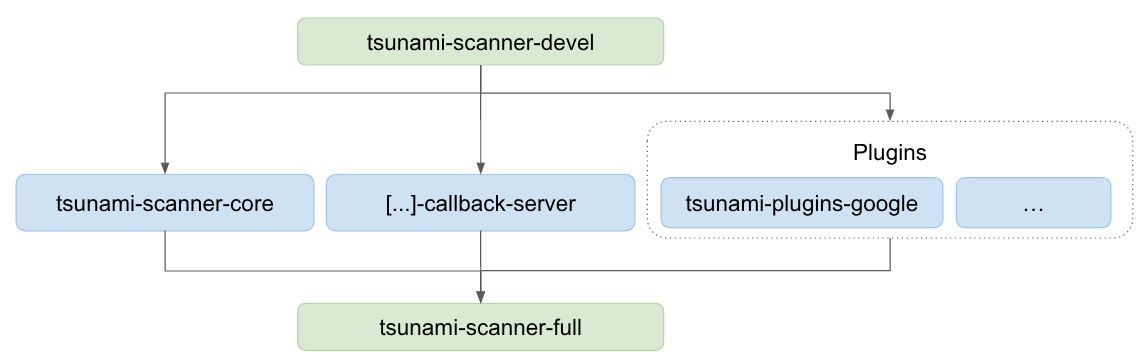
We provide a set of Docker images to help you build and use Tsunami. We provide a minimal (scratch) image for:
- The core engine only;
- The callback server only;
- Each category of plugin;
Using these minimal images is not recommended, instead we recommend composing on top of them.
Running the latest version of Tsunami
If you just want to run the latest version of Tsunami, without having to recompile anything, you can directly use the latest full image of Tsunami.
# Important: If you built a local version of the container, do not pull as it
# will overwrite your changes. Otherwise, do pull as you would be using a stale
# version of the image.
$ docker pull ghcr.io/google/tsunami-scanner-full

# Run the image
$ docker run -it --rm ghcr.io/google/tsunami-scanner-full bash

# If you want to use Python plugins
(docker) $ tsunami-py-server >/tmp/py_server.log 2>&1 &

# If you want to use the callback server
(docker) $ tsunami-tcs >/tmp/tcs_server.log 2>&1 &

# Run Tsunami
# Note: If you did not start the python server, omit the `--python-` arguments.
(docker) $ tsunami --ip-v4-target=127.0.0.1 --python-plugin-server-address=127.0.0.1 --python-plugin-server-port=34567
This images contains everything necessary under the /usr/tsunami directory.
To use the callback server, you might have to setup port forwarding with your
docker container when starting it. We encourage you to refer to the -p option
of Docker.
A few tips:
- Only scan one port:
--port-ranges-target - Only run your detector:
--detectors-include="detector-name"; where detector name is the name defined inPluginInfosection for Java and Python plugins and theinfo.namesection on templated plugins.
Using docker to build Tsunami
In this section, we go through the different ways to compile the core engine or a plugin locally so that you can test your changes.
It assumes that you have cloned both the tsunami-security-scanner and
tsunami-security-scanner-plugins repositories.
Rebuilding the core engine
If you need to make changes to the core engine during the development cycle, you will have to perform the following actions to test your change:
- Rebuild the core engine container;
# Build the core engine container
$ cd tsunami-security-scanner
$ docker build -t ghcr.io/google/tsunami-scanner-core:latest -f core.Dockerfile .
- Rebuild all plugins to ensure your change is compatible
IMPORTANT: Your changes must be committed via git to be picked. They do not need to be pushed to GitHub, they can be local only.
In the following example, we will use docker volumes to mount our changes to
/usr/tsunami/repos/tsunami-security-scanner. This assumes that our
tsunami-security-scanner and tsunami-security-scanner-plugins clones are in
/tsunami/ on our host. Also, our changes are committed to the master branch.
You can change the commands accordingly if your repositories path or branch are
different.
$ cd tsunami-security-scanner-plugins
First, we need to change the Dockerfile to use our changes:
-ENV GITREPO_TSUNAMI_CORE="https://github.com/google/tsunami-security-scanner.git"
-ENV GITBRANCH_TSUNAMI_CORE="stable"
+ENV GITREPO_TSUNAMI_CORE="/usr/tsunami/repos/tsunami-security-scanner"
+ENV GITBRANCH_TSUNAMI_CORE="master"
We also need to instruct docker to bind our changes in /usr/tsunami/repos:
- RUN gradle build
+ RUN --mount=type=bind,source=/tsunami-security-scanner,target=/usr/tsunami/repos/tsunami-security-scanner \
+     gradle build
+
Then we can rebuild all plugins in one swoop:
$ docker build -t ghcr.io/google/tsunami-plugins-all:latest --build-arg=TSUNAMI_PLUGIN_FOLDER=tsunami-security-scanner-plugins -f tsunami-security-scanner-plugins/Dockerfile /tsunami/
- Rebuild the
-fullcontainer;
$ cd tsunami-security-scanner
We need to change the full.Dockerfile to use our newly created container:
# Plugins
- FROM ghcr.io/google/tsunami-plugins-google:latest AS plugins-google
- FROM ghcr.io/google/tsunami-plugins-templated:latest AS plugins-templated
- FROM ghcr.io/google/tsunami-plugins-doyensec:latest AS plugins-doyensec
- FROM ghcr.io/google/tsunami-plugins-community:latest AS plugins-community
- FROM ghcr.io/google/tsunami-plugins-govtech:latest AS plugins-govtech
- FROM ghcr.io/google/tsunami-plugins-facebook:latest AS plugins-facebook
- FROM ghcr.io/google/tsunami-plugins-python:latest AS plugins-python
+ FROM ghcr.io/google/tsunami-plugins-all:latest AS plugins-all

{...}

- COPY --from=plugins-google /usr/tsunami/plugins/ /usr/tsunami/plugins/
- COPY --from=plugins-templated /usr/tsunami/plugins/ /usr/tsunami/plugins/
- COPY --from=plugins-doyensec /usr/tsunami/plugins/ /usr/tsunami/plugins/
- COPY --from=plugins-community /usr/tsunami/plugins/ /usr/tsunami/plugins/
- COPY --from=plugins-govtech /usr/tsunami/plugins/ /usr/tsunami/plugins/
- COPY --from=plugins-facebook /usr/tsunami/plugins/ /usr/tsunami/plugins/
- COPY --from=plugins-python /usr/tsunami/py_plugins/ /usr/tsunami/py_plugins/
+ COPY --from=plugins-all /usr/tsunami/plugins/ /usr/tsunami/plugins/
And then rebuild it:
$ docker build -t ghcr.io/google/tsunami-scanner-full:latest -f full.Dockerfile .
- Run the scanner to check that everything works.
See the “Running the latest version of Tsunami” section on this page to run Tsunami with the newly built image. DO NOT perform a docker pull.
Rebuilding a whole category of plugins
Tsunami groups plugins per categories. From the root folder of the plugin
repository, you can see that the categories are google, community,
templated and so on.
Our docker images are built separately for each category. The same Dockerfile
is used, but it is parameterized to use a different folder with
TSUNAMI_PLUGIN_FOLDER.
$ cd tsunami-security-scanner-plugins
$ build -t ghcr.io/google/tsunami-plugins-category:latest --build-arg TSUNAMI_PLUGIN_FOLDER=category .

# For example with the community category:
$ build -t ghcr.io/google/tsunami-plugins-community:latest --build-arg TSUNAMI_PLUGIN_FOLDER=community .
For Python plugins, you need to use the dedicated Dockerfile, which only supports bundling all plugins:
$ cd tsunami-security-scanner-plugins
$ build -t ghcr.io/google/tsunami-plugins-python:latest -f python.Dockerfile .
Once you have rebuilt the categories that you need, you can rebuild the -full
image:
$ cd tsunami-security-scanner
$ docker build -t ghcr.io/google/tsunami-scanner-full:latest -f full.Dockerfile .
Then follow “Running the latest version of Tsunami” to use this new image. DO
NOT perform a docker pull.
Building an image for one plugin
Now, if during development you only wish to build your plugin, you can do so by creating a new local-only category.
Before you start, you will need to change the definition of the
full.Dockerfile file:
- Add a
FROMdirective in the Plugins section:
FROM ghcr.io/google/tsunami-plugins-python:latest AS plugins-python
+ FROM ghcr.io/google/tsunami-plugins-local:latest AS plugins-local
- Add a
COPYdirective in the section that copies everything:
COPY --from=plugins-python /usr/tsunami/py_plugins/ /usr/tsunami/py_plugins/
+ COPY --from=plugins-local /usr/tsunami/plugins/ /usr/tsunami/plugins/
Then, you can build the actual image containing only your plugin:
$ cd tsunami-security-scanner-plugins
$ build -t ghcr.io/google/tsunami-plugins-local:latest --build-arg TSUNAMI_PLUGIN_FOLDER=path/to/my/plugin .
Finally, compile the -full image:
$ cd tsunami-security-scanner
$ docker build -t ghcr.io/google/tsunami-scanner-full:latest -f full.Dockerfile .
Then follow “Running the latest version of Tsunami” to use this new image. DO
NOT perform a docker pull.
Python plugins do not support building only one plugin. See building the whole category instead.
Building Tsunami without docker
We do not provide support for building Tsunami outside of our docker environment.
You can use the Dockerfile provided in the repositories to build your own toolchain if you so wish.