CI/CD & Production
Set up a CI/CD pipeline that tests on pull request, deploys to staging on merge, and promotes to production with manual approval.
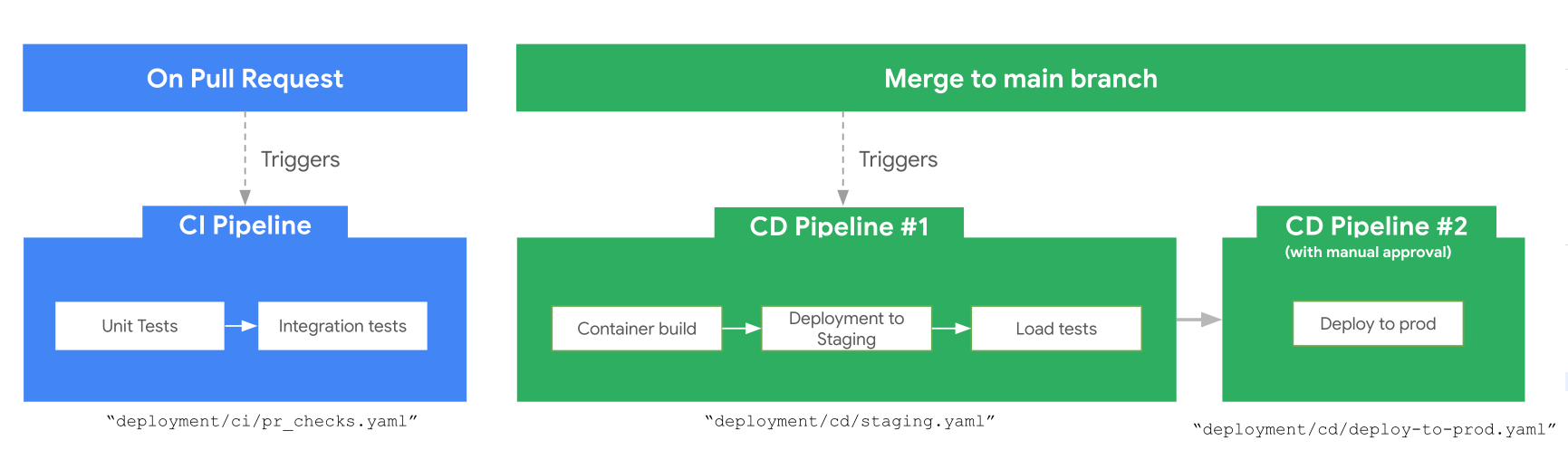
How the Pipeline Works
-
CI Pipeline (triggered on pull request):
- Runs unit and integration tests.
-
Staging CD Pipeline (triggered on merge to
main):- Builds and pushes a container to Artifact Registry.
- Deploys to the staging environment.
- Runs automated load testing.
-
Production Deployment (triggered after successful staging):
- Requires manual approval before proceeding.
- Deploys the same container image tested in staging.
Set Up the Pipeline
Run a single command to provision infrastructure and configure CI/CD:
This handles:
- Infrastructure provisioning via Terraform for staging and production
- CI/CD configuration with your chosen runner (Cloud Build or GitHub Actions)
- Repository connection to GitHub
CI/CD Runner Detection
| Runner | How It's Detected |
|---|---|
| GitHub Actions | Auto-detected from wif.tf in your project. Uses Workload Identity Federation for keyless auth. |
| Google Cloud Build | Auto-detected from Terraform config. Sets up Cloud Build connection to GitHub. |
Options
| Flag | Description |
|---|---|
--staging-project |
GCP project ID for staging (required) |
--prod-project |
GCP project ID for production (required) |
--cicd-project |
Separate project for CI/CD resources (defaults to prod) |
--dev-project |
Dev project (optional, provisions dev infra too) |
--repository-name |
GitHub repository name |
--repository-owner |
GitHub repository owner |
--local-state |
Use local Terraform state instead of GCS |
--create |
Create a new GitHub repository (omit to use an existing one) |
Terraform Variables
The pipeline uses Terraform variables defined in deployment/terraform/variables.tf:
| Variable | Description |
|---|---|
project_name |
Base name for resource naming |
prod_project_id |
Google Cloud project ID for production |
staging_project_id |
Google Cloud project ID for staging |
cicd_runner_project_id |
Google Cloud project ID where CI/CD pipelines execute |
region |
Google Cloud region (default: us-west1) |
repository_name |
GitHub repository name |
repository_owner |
GitHub username or organization |
app_sa_roles |
Roles for the application service account |
cicd_roles |
Roles for CI/CD runner service account |
Once deployed, register your agent with Gemini using agents-cli publish gemini. Run with --help for all options.