Cloud Trace
For developers who have deployed an agent and want to verify tracing works and inspect telemetry data.
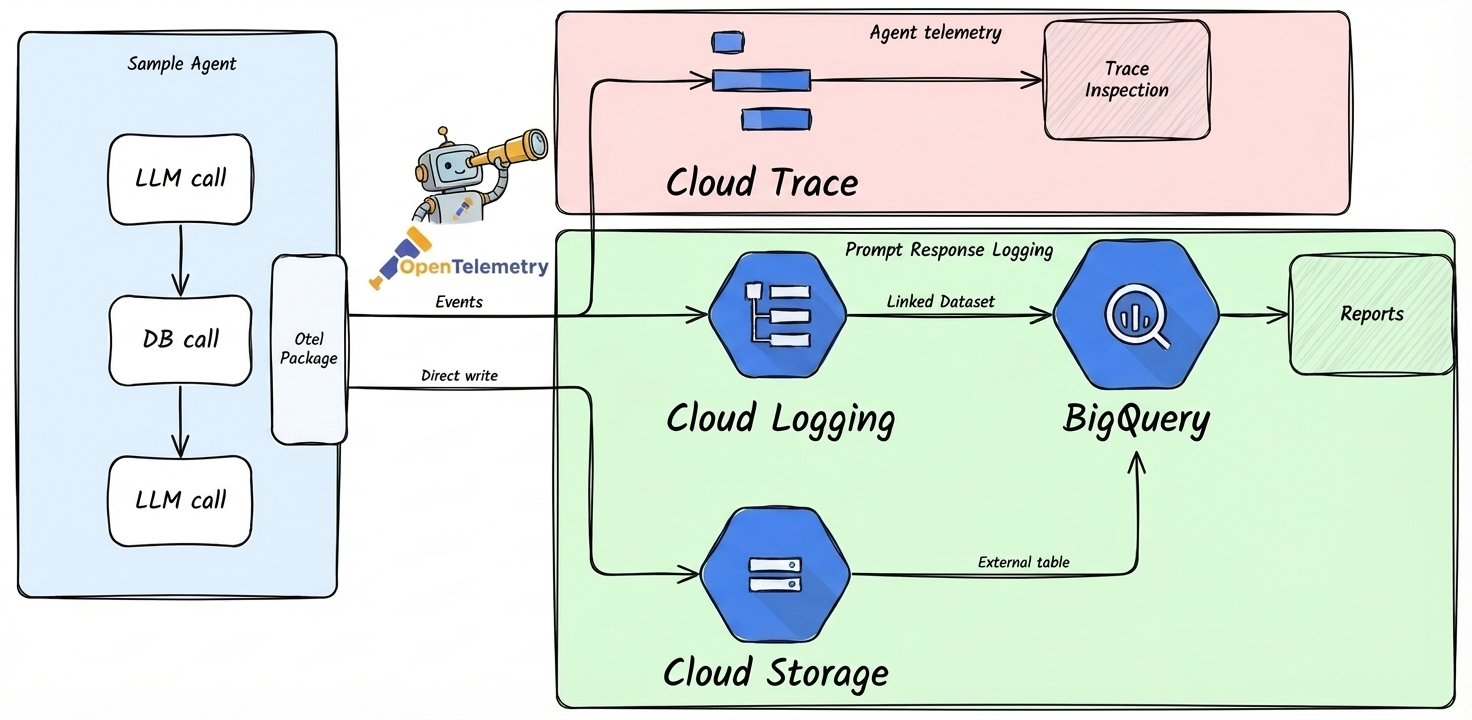
Cloud Trace is enabled by default in all agents-cli projects. This guide shows how to verify it works and query your telemetry data.
Verify Tracing in Your Deployment
After deploying to your development environment, confirm telemetry data is flowing:
1. Deploy and Generate Test Traffic
Send a few test requests to your agent.
2. View Traces
Open the Google Cloud Console and navigate to Trace > Trace explorer. You should see traces for each request, with spans showing LLM calls and tool executions.
3. Verify Prompt-Response Logging (Optional)
Prompt-response logging to GCS and BigQuery is provisioned by Terraform (agents-cli infra single-project or agents-cli infra cicd), which creates the logs bucket and dataset and sets LOGS_BUCKET_NAME — it's enabled automatically there. A bare agents-cli deploy does not create these resources, so the checks below apply only to Terraform-provisioned deployments.
PROJECT_ID="your-dev-project-id"
PROJECT_NAME="your-project-name"

# Check for telemetry files in GCS
gsutil ls gs://${PROJECT_ID}-${PROJECT_NAME}-logs/completions/

# Query telemetry in BigQuery
bq query --use_legacy_sql=false \
  "SELECT * FROM \`${PROJECT_ID}.${PROJECT_NAME}_telemetry.completions\` LIMIT 10"
If data isn't appearing:
- Check that the service account has the
storage.objectCreatorrole. - Verify
LOGS_BUCKET_NAMEis set in your deployment environment variables. - Check application logs in Cloud Logging for telemetry setup warnings.
Enable Prompt-Response Logging Locally
By default, agents-cli playground runs without prompt-response logging. Telemetry is
declarative (there's no runtime setup_telemetry()), so to enable completions logging locally set
the same vars Terraform sets for deployed agents (ADK agents only):
export LOGS_BUCKET_NAME="your-dev-project-id-your-project-name-logs"   # bare bucket name, no gs://
export OTEL_INSTRUMENTATION_GENAI_CAPTURE_MESSAGE_CONTENT="NO_CONTENT"  # or EVENT_ONLY for full content in logs
export OTEL_INSTRUMENTATION_GENAI_COMPLETION_HOOK="upload"
export OTEL_INSTRUMENTATION_GENAI_UPLOAD_BASE_PATH="gs://your-dev-project-id-your-project-name-logs/completions"
export OTEL_INSTRUMENTATION_GENAI_UPLOAD_FORMAT="jsonl"
export OTEL_SEMCONV_STABILITY_OPT_IN="gen_ai_latest_experimental"
agents-cli playground
Disable Prompt-Response Logging in Deployments
To disable it in a deployed environment, edit deployment/terraform/single-project/service.tf:
Then apply:
Configuration Reference
| Variable | Values | Purpose |
|---|---|---|
LOGS_BUCKET_NAME |
GCS bucket name (no gs://) |
Required for prompt-response logging. If not set, logging is disabled. |
OTEL_INSTRUMENTATION_GENAI_CAPTURE_MESSAGE_CONTENT |
NO_CONTENT, EVENT_ONLY, SPAN_ONLY, SPAN_AND_EVENT |
Controls content in traces/events only (not the GCS/BigQuery completions, which always capture full content when a bucket is set). Experimental semconv (we set OTEL_SEMCONV_STABILITY_OPT_IN): NO_CONTENT = none in spans/events (default); EVENT_ONLY = content in Cloud Logging events; SPAN_* = content in trace spans. true/false are invalid — rejected, fall back to NO_CONTENT. |
OTEL_INSTRUMENTATION_GENAI_COMPLETION_HOOK |
upload |
Enables uploading completion records |
OTEL_INSTRUMENTATION_GENAI_UPLOAD_BASE_PATH |
gs://<bucket>/completions |
Destination for completion records |
OTEL_INSTRUMENTATION_GENAI_UPLOAD_FORMAT |
jsonl |
Upload format |
OTEL_SEMCONV_STABILITY_OPT_IN |
gen_ai_latest_experimental |
Required for the GenAI completion/upload semconv |
ADK_CAPTURE_MESSAGE_CONTENT_IN_SPANS |
false, true |
Keep prompt/response content out of trace spans (false, the default we set) |